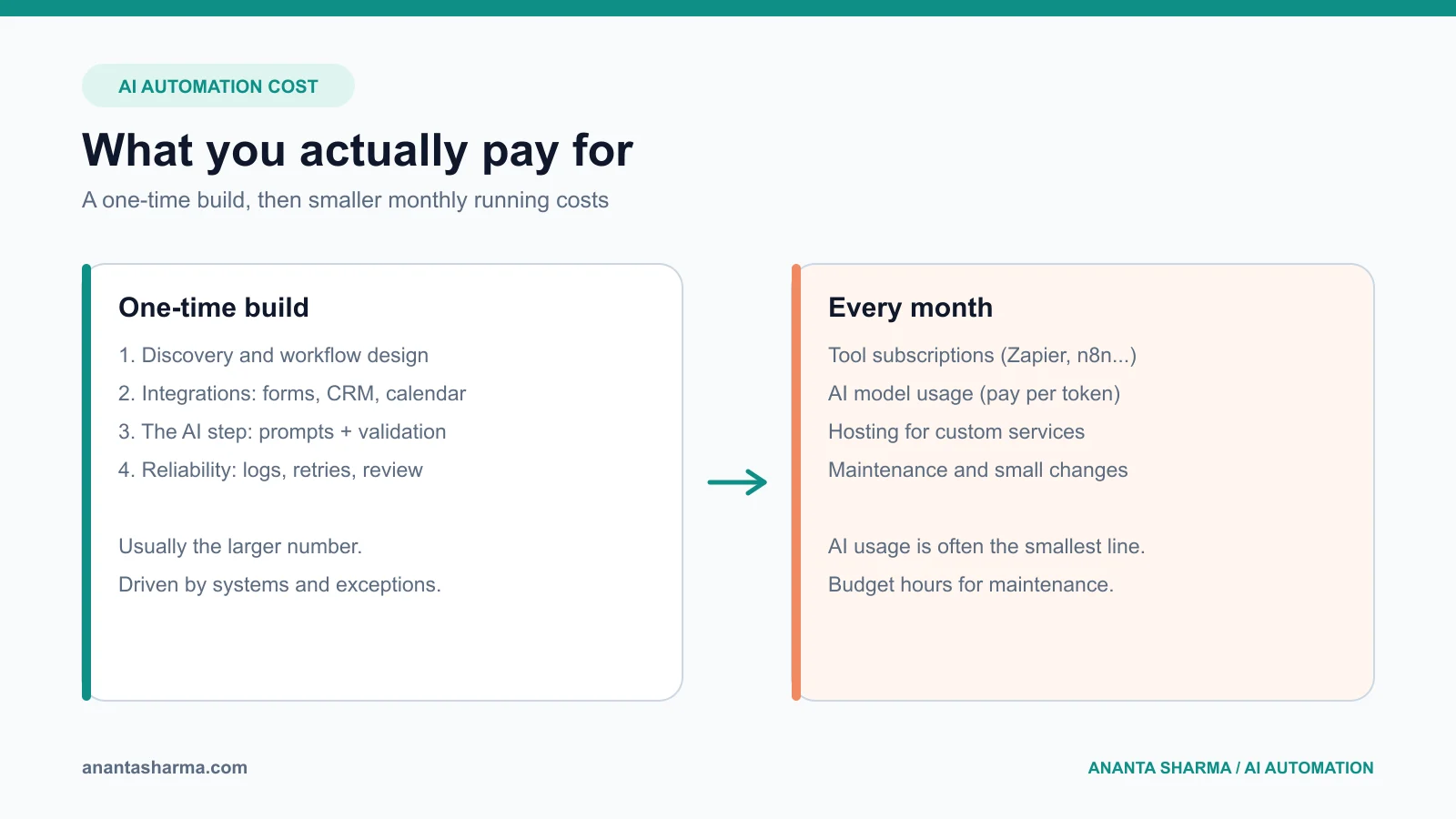
AI automation for a small business has two costs: a one-time build cost, driven mostly by how many systems must be connected and how many exceptions the workflow has, and a monthly running cost made up of software subscriptions, AI model usage, and maintenance. For most first workflows, the build is the larger number and the AI usage is the smallest.
That answer is less satisfying than a single price, but it is the honest one. Two businesses can both ask for "an AI that follows up with leads" and need very different systems: one needs a form connected to an email sequence, the other needs phone, SMS, email, a CRM, a calendar, and a human approval step for quotes. This guide breaks down what you are actually paying for, gives example scopes from small to large, and shows how to estimate the return before you spend anything.
What are you actually paying for?
Every AI automation project, whether it is built in Zapier, n8n, or custom code, has the same five cost components. When a quote seems high or suspiciously low, it is usually because one of these was included or left out.
- Discovery and workflow design. Mapping how the work happens today, which systems hold the data, what counts as success, and which cases must go to a person. Skipping this step is the most common reason automations get rebuilt.
- Integration work. Connecting forms, inboxes, CRMs, calendars, payment tools, and spreadsheets. Each system adds authentication, field mapping, rate limits, and failure handling. This is usually the biggest part of the build.
- The AI step itself. Prompting, structured output, validation, and testing against real examples. A well-scoped AI step, such as classifying an enquiry or extracting fields from an email, is often a small share of the total effort.
- Reliability work. Logging, retries, duplicate prevention, alerts, and a review queue for uncertain results. This is what separates a demo from something you can leave running.
- Running and maintenance. Tool subscriptions, AI model usage, hosting, and the time to fix things when a connected app changes its API or your process changes.
What drives the build cost up or down?
The price of a build is driven far more by complexity than by the word "AI". These are the factors that move it most:
| Factor | Lower cost | Higher cost |
|---|---|---|
| Number of systems connected | 1–2 tools with good APIs | 4+ tools, legacy software, or no API |
| Data quality | Clean, consistent fields | Free-text, duplicates, scattered spreadsheets |
| Exceptions | Most cases follow one path | Many special cases and approvals |
| Consequence of mistakes | Internal notes, drafts | Customer messages, pricing, payments |
| Volume | Dozens of items per day | Thousands, with rate limits and queues |
| Reporting | A simple log | Dashboards, audit trails, compliance records |
A useful rule: if a task has clear inputs, a clear output, and a person who can check the result, it is cheap to automate. If nobody on the team can describe the rules consistently, the automation will be expensive because you are paying to design the process as well as build it.
Example scopes: small, medium, and large
Rather than quote prices that vary by country and developer, here are three realistic scopes in build effort. Multiply the days by the day rate of whoever you hire, and you have a sensible budget range.
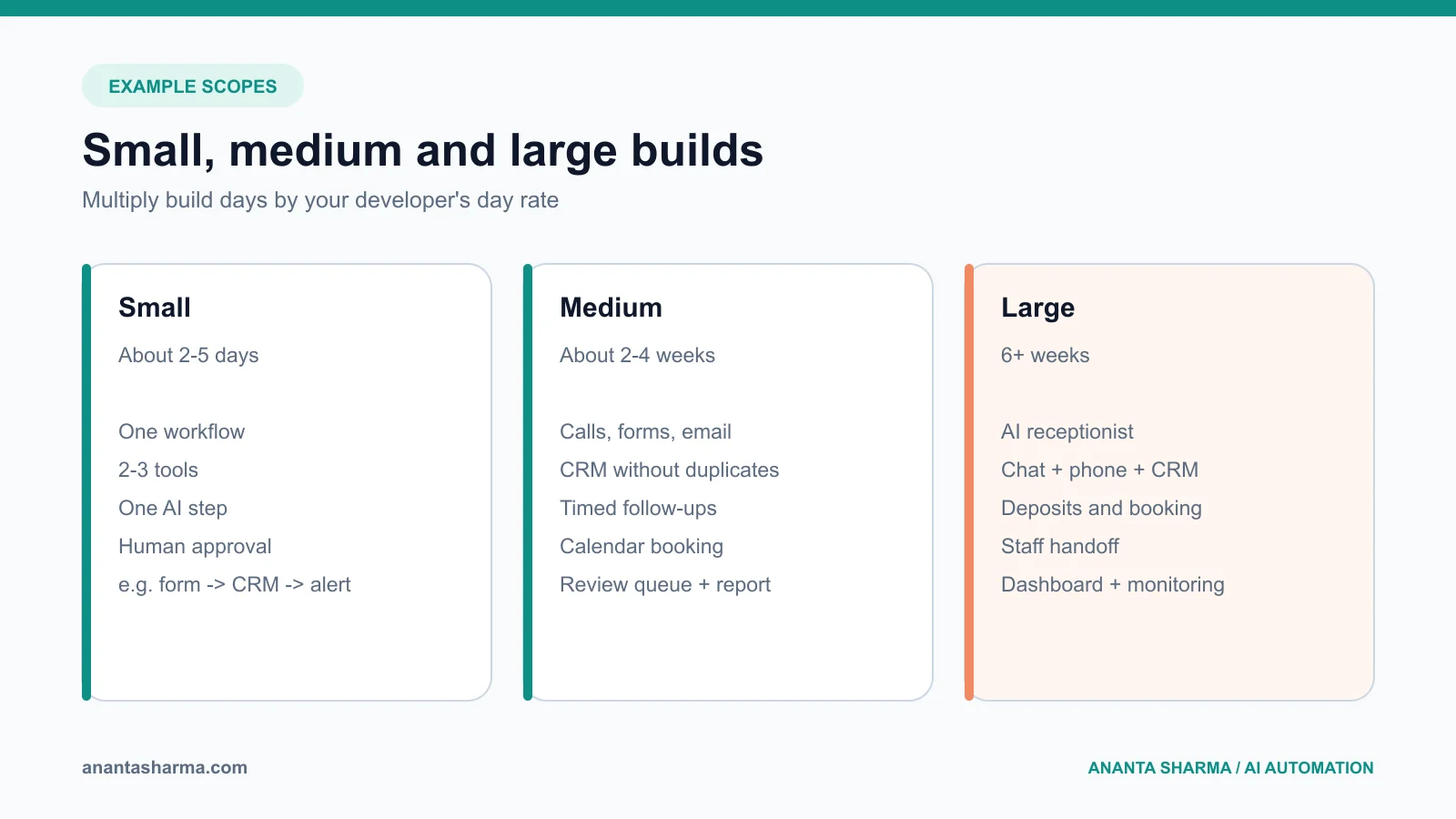
Small: one workflow, two or three tools (about 2–5 days)
Example: A website enquiry form sends each lead to the CRM, an AI step classifies the service type and urgency, and the right person gets a notification with a suggested reply to approve.This fits a no-code tool such as Zapier or Make, or a small n8n workflow. Running costs are typically a tool subscription plus a few dollars of AI usage per month at small-business volume. For a step-by-step version of this, see lead intake automation for small business.
Medium: a connected workflow with exceptions (about 2–4 weeks)
Example: A contractor's lead follow-up system that captures calls, form fills, and emails; creates or updates a CRM record without duplicates; sends timed follow-ups; books site visits against a live calendar; and routes quote questions to a person.At this size, the reliability work matters: deduplication, retries, a review queue, and a weekly report. Many businesses outgrow pure no-code here, and a small custom service starts to make sense. The AI lead follow-up guide for contractors walks through this architecture.
Large: an AI-assisted system across the business (6+ weeks)
Example: An AI receptionist that answers calls and chat, books appointments, updates the CRM, takes deposits, and hands off to staff with a full summary, plus an internal dashboard to review conversations.This is closer to a software product than an automation. It needs authentication, permissions, monitoring, and a plan for when the AI is wrong. The AI receptionist guide covers what should stay human.
How much does the AI part cost to run?
For most small-business workflows, AI model usage is the cheapest line on the bill. Models are priced per token (roughly, per chunk of words processed). A typical task, such as reading one enquiry and returning a category, a priority, and a short draft reply, processes a few thousand tokens.
You can estimate it in two minutes:
monthly AI cost ≈ tasks per month × tokens per task × price per tokenTake 1,000 enquiries a month at roughly 3,000 tokens each. That is 3 million tokens. Check the current price on your provider's pricing page, multiply, and you will usually find the result is small compared with the software subscriptions and far smaller than the staff time saved. Costs climb when a workflow sends very long documents, runs many AI calls per task, or uses the largest model for work a smaller one handles well.
The more important running cost is maintenance. Connected apps change their APIs, your team changes the process, and edge cases appear in month two that nobody saw in testing. Budget for a few hours a month, or a small retainer, for any workflow your business depends on.
No-code vs custom: which is cheaper?
No-code tools are usually cheaper to start and custom code is usually cheaper at scale. The deciding factors are volume, complexity, and how much you need to control.
| No-code (Zapier, Make, n8n cloud) | Custom code (e.g. Node.js/NestJS service) | |
|---|---|---|
| Upfront cost | Low | Higher |
| Monthly cost at low volume | Low | Low (hosting is cheap) |
| Monthly cost at high volume | Can grow quickly with task-based pricing | Grows slowly |
| Complex logic and exceptions | Gets hard to maintain | Handled cleanly in code |
| Testing, versioning, audit logs | Limited | Full control |
| Who can change it | Non-developers | A developer |
A common and sensible path is to prove the workflow in a no-code tool, then move it to code once volume or complexity makes the no-code version fragile. The full comparison is in n8n vs Zapier vs custom software.
How do you work out whether it is worth it?
Estimate the return before you ask for quotes. You need three numbers you probably already know:
- Time saved. Hours per week spent on the task × the loaded hourly cost of the person doing it.
- Revenue protected. Leads lost to slow response × your close rate × average job value. For many service businesses, faster follow-up is worth more than the time saved.
- Errors avoided. Missed bookings, duplicate records, invoices sent late.
If the numbers do not work, that is useful too. It usually means the first workflow should be narrower, not that automation is wrong for the business. The AI workflow automation guide has a checklist for choosing the first process.
How to avoid overpaying
These are the patterns I see most often when a small business pays more than it should:
- Automating a broken process. If the manual process has no clear rules, the automation inherits the confusion. Fix the process first.
- Starting with an "AI agent" when a workflow will do. Most first automations are predictable steps with one AI decision in the middle. A fully autonomous agent costs more to build, test, and trust. See AI agents for small business for when an agent is justified.
- No ownership after launch. Ask who fixes it when it breaks, how you will know it broke, and what that costs.
- Paying for features nobody measured. Agree on two or three numbers (response time, hours saved, leads captured) before the build, and measure them after.
- Buying a platform for one workflow. An all-in-one AI platform subscription can cost more per year than a focused custom workflow that does exactly what you need.
What a good quote should include
Whether you hire me or someone else, a trustworthy quote for AI automation should state:
- the exact workflow in scope, with its start trigger and end result;
- the systems it connects and who provides access;
- what happens when the AI is uncertain or a connected system is down;
- the monthly running costs you will pay directly (subscriptions, AI usage, hosting);
- how you will see what the automation did (logs, a dashboard, a weekly summary);
- what is out of scope; and
- support terms after launch.
If a quote is missing most of these, ask for them before comparing prices. A cheaper quote that leaves out reliability and support is rarely cheaper six months later. For a full list of questions to ask, read how to hire an AI automation developer.
Frequently asked questions
Is AI automation affordable for a very small business?
Yes, if the first scope is narrow. A single workflow connecting two or three tools, with one AI step and a human review, is a small project with low running costs. Start there and expand only after the first workflow proves its value.
Do I need to pay for an AI subscription such as ChatGPT Team?
Not for automation. Automated workflows call AI models through an API and pay per use, which is separate from chat subscriptions your team may use day to day.
What is the cheapest way to start?
Write down one repetitive task, how often it happens, and how long it takes. Then prototype it in a no-code tool or book a short discovery call. The cheapest automation is the one scoped correctly the first time.
How long does it take to see a return?
For a well-chosen first workflow, the time savings start as soon as it runs. Revenue effects, such as more booked jobs from faster follow-up, usually become measurable within one to three months of steady volume.
Get a realistic estimate for your workflow
I build AI automations, integrations, and backend systems for small businesses and product teams, with logging and human review built in from the start. If you have one workflow in mind, book a free 20-minute call. We will map it, estimate the build effort and running cost, and tell you honestly whether it is worth automating. You can also see the AI automation services for service businesses or all services.