
Lead Intake Automation for Small Business: Forms, CRM, Qualification, and Fast Follow-Up
Small businesses often have plenty of ways for a customer to ask for help: a website form, an email address, a phone number, social media, and sometimes a messaging app. The problem is not the number of channels. The problem is what happens after the enquiry arrives.
Lead intake automation for small business is the process of turning those scattered requests into a complete, usable record with a clear next action. Done well, it helps an owner respond faster without forcing every customer through a long form or replacing the human conversation that closes the work.
This guide covers the practical design of automated lead capture, qualification, CRM integration, and owner handoff for consultants, trades, agencies, studios, clinics, and other service companies.
What a good lead intake system changes
A useful system should make five things easier:
- the customer can explain the need without friction;
- the team receives the details that change the next action;
- duplicate requests become one conversation;
- the owner sees what is urgent and what is missing; and
- every qualified lead has a person, a stage, and a next step.
That is the difference between a form and a workflow. A form collects fields. A workflow moves a request toward a decision.
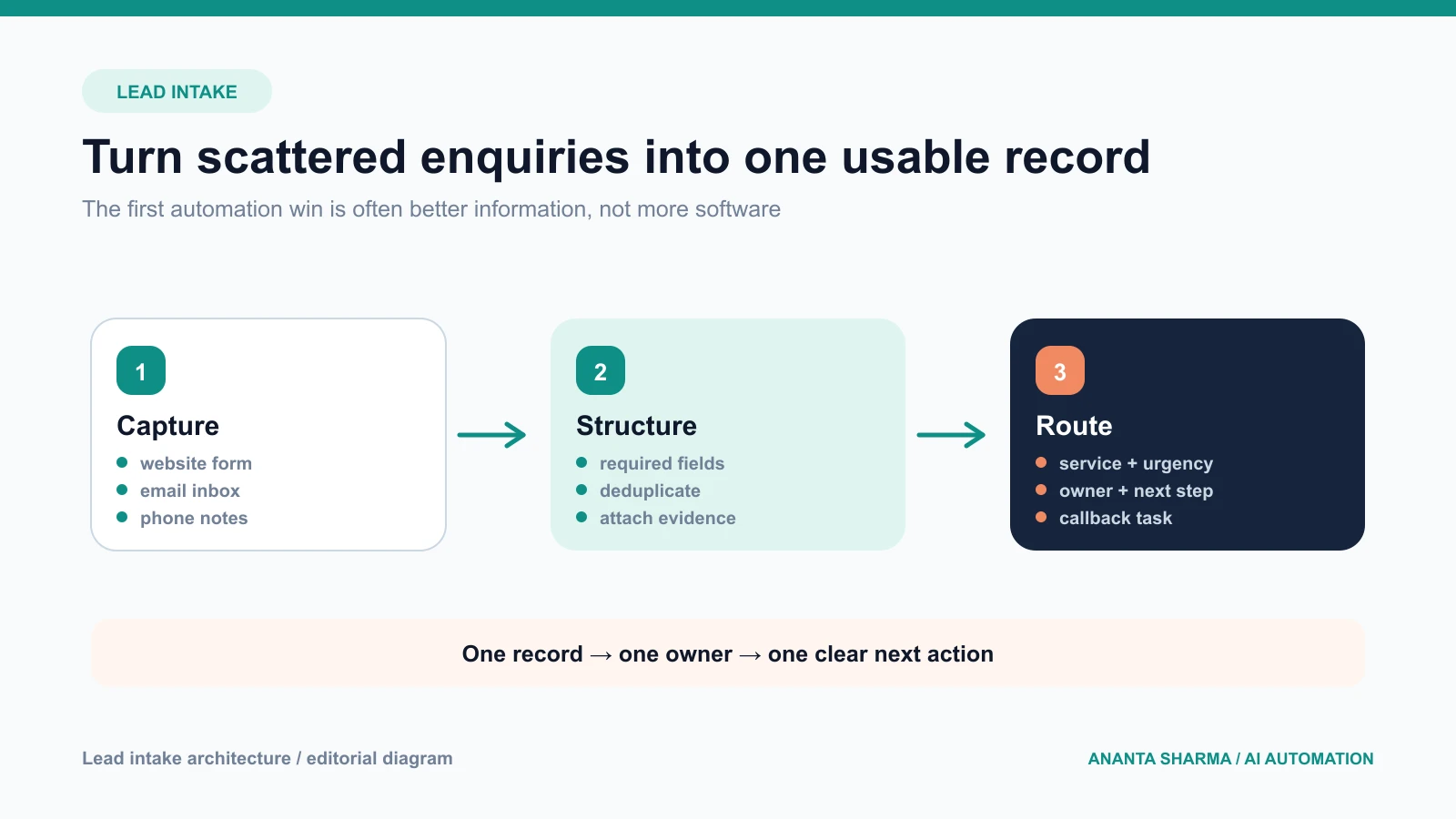
Start with the business decision, not the tool
Before choosing a CRM, chatbot, or AI form builder, ask what the team needs to decide when a lead arrives. For a local service business, that might be whether the job is in the service area, whether the service is offered, whether the request is urgent, and whether a site visit is needed. For a consultancy, it might be budget range, timeline, team size, and the problem the project should solve.
Write the decision in plain language:
“Can we respond with a useful next step within one business day?”
Then map the fields that support that decision. If a field does not change qualification, routing, scheduling, or preparation, it may not belong on the first form.
Design a short form that still gives context
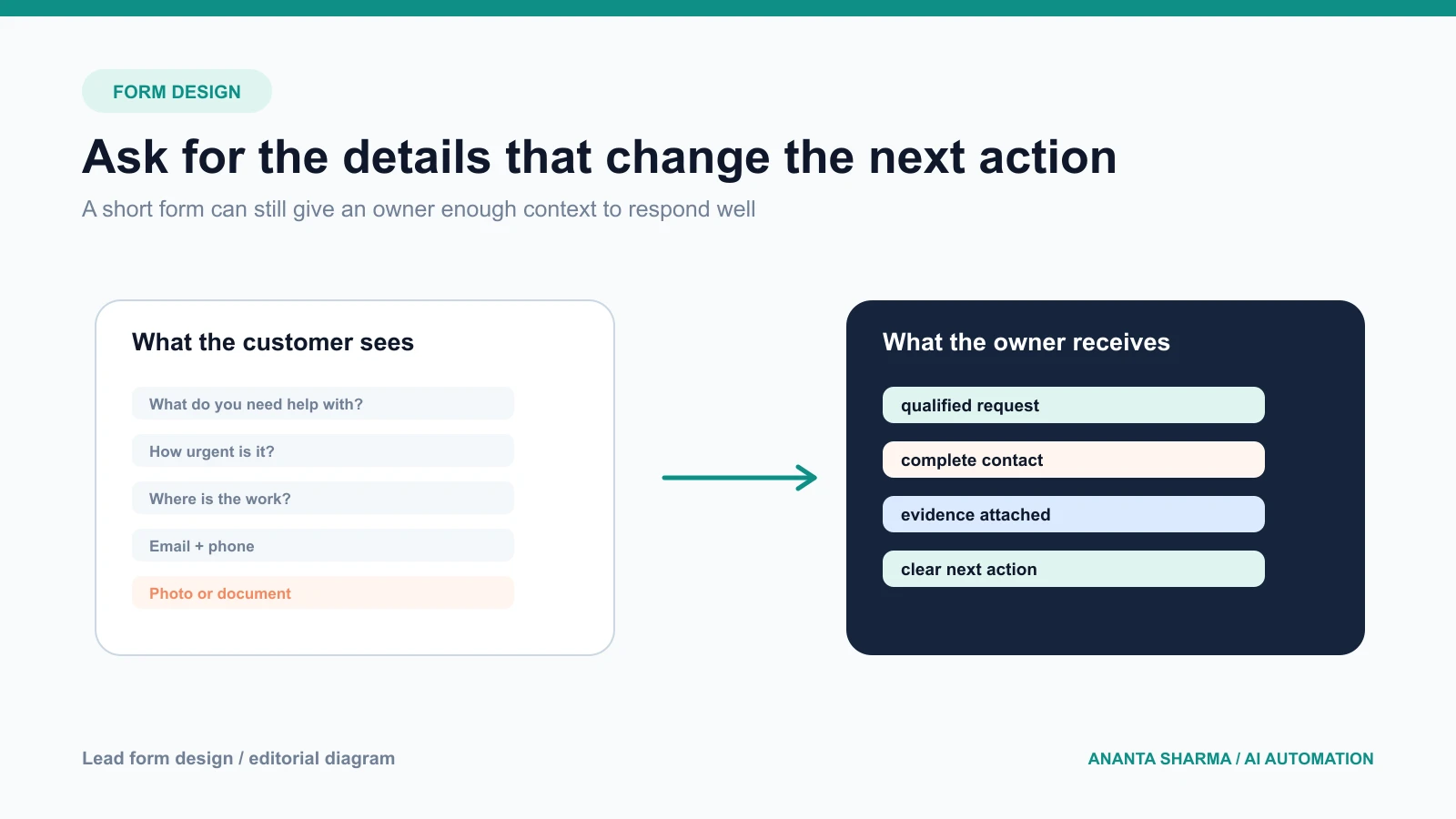
The strongest lead forms are usually shorter than the internal checklist used by the team. Ask for the minimum information needed to route the request, then gather more detail after the customer has shown intent.
Common first-step fields include:
- name and preferred contact method;
- email and phone number;
- service or project type;
- location or service area;
- urgency or preferred timeframe;
- a short description of the problem; and
- a photo, document, or existing link when it changes the review.
Use plain labels and explain why an attachment helps. Provide a useful success message that tells the customer when to expect a reply and what will happen next.
Avoid asking for sensitive information that is not required for the first response. Do not create a form that feels like an application when the customer only wants to ask whether the business can help.
Connect every channel to one record
If a website form creates a CRM contact, an email enquiry creates a spreadsheet row, and a phone call lives in a notebook, the business has three partial systems. Automated lead capture should normalize the important fields into one record while keeping the original message or file reference available for context.
A practical lead record might contain:
source: website, email, phone, referral, or campaign;sourcePage: the page or campaign that generated the enquiry;service: a controlled service value;location: city, region, or service area;urgency: normal, soon, or urgent;summary: a short human-readable description;attachments: safe references to photos or documents;owner: the person responsible for the next step;stage: new, qualified, scheduled, won, lost, or paused; andnextActionAt: when the next step is due.
Keep raw message text and personal data out of analytics events. Operational records and measurement data have different purposes and should not be mixed casually.
Where AI helps in lead qualification
AI can be useful inside a controlled intake workflow. It can classify a free-text description, extract a city or requested date, identify missing information, summarize a long email thread, or suggest a routing label. It can also draft a confirmation message from approved business information.
The model should return structured data that the server validates. The application should decide whether a service is available, whether the lead is in a service area, which team member owns it, and whether a message can be sent. Do not let a model invent a price, availability, guarantee, or eligibility decision.
For uncertain cases, the system should create a review task rather than forcing a confident answer. The review screen should show the original request, the extracted fields, the reason for the suggested route, and clear approve, edit, reject, and escalate actions.
Build a clear human handoff
Automation is valuable when it prepares the next conversation. It should not hide the fact that a human is responsible for the decision.
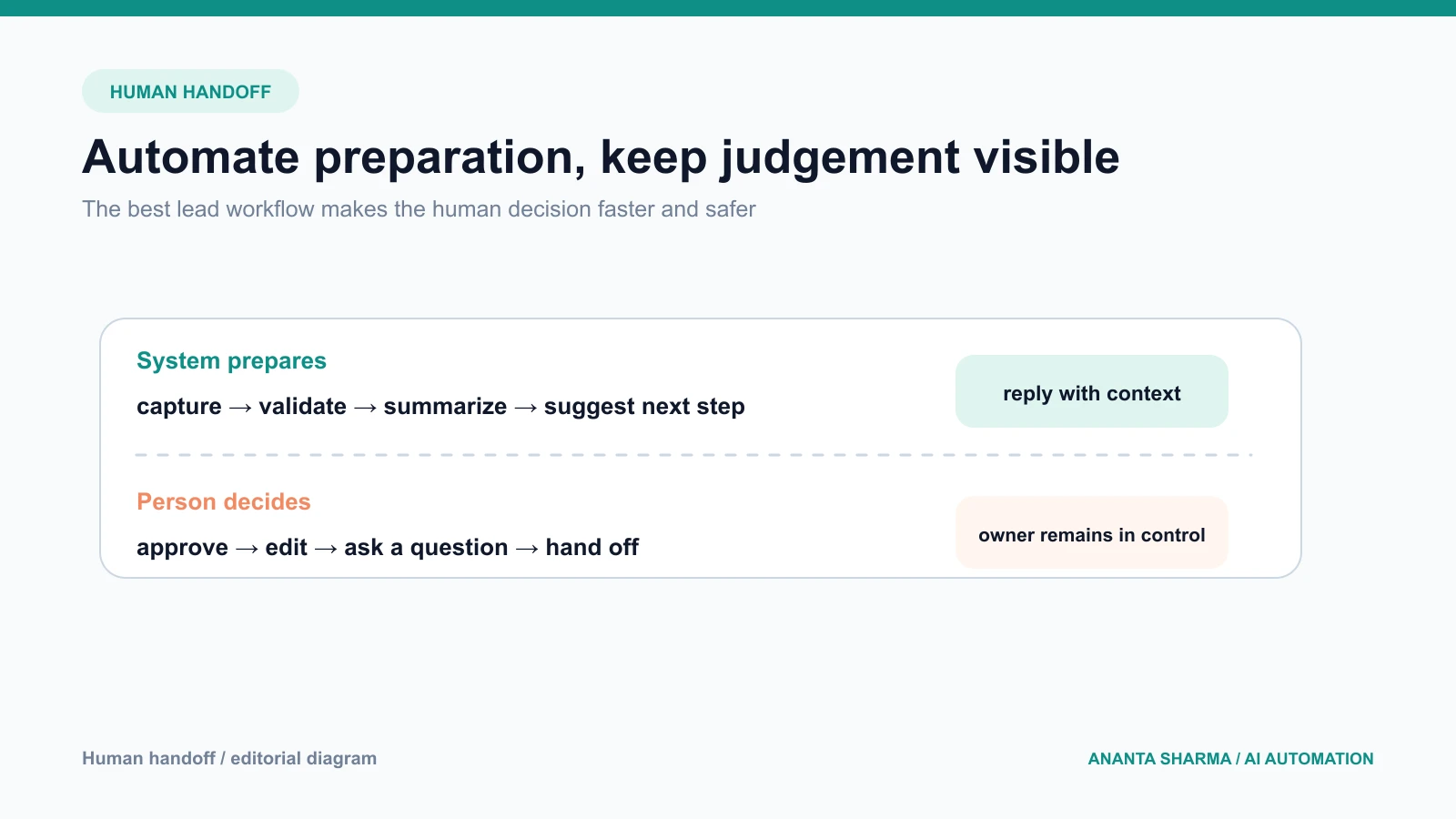
Use a handoff rule such as:
- Auto-confirm: the form was received and the expected response time is known.
- Owner review: the service, location, or urgency is uncertain.
- Fast alert: the customer reports an urgent issue or a time-sensitive need.
- Manual escalation: the request involves a sensitive, regulated, or high-impact decision.
The customer should never be trapped in an invisible automation queue. Give them a real contact path, and make it easy for the owner to take over.
CRM integration patterns that work
Form to CRM
This is the simplest pattern. The server validates the form, creates or updates a contact, creates an opportunity, and assigns a task. Use an idempotency key or provider submission ID so a retry does not create duplicates.
Inbox to CRM
The system watches a shared inbox or uses an email provider event to create a draft lead. It should preserve the original thread, distinguish new enquiries from replies, and avoid creating a new lead every time someone adds a signature or sends an attachment.
Phone note to CRM
An owner or team member enters a short note after the call. AI can turn the note into structured fields, but the person should be able to correct the record before a quote or follow-up task is created.
Multi-channel intake
All three channels use the same normalization and qualification rules. This is where a backend integration becomes more valuable than separate no-code recipes: the business rules stay in one place, and every path produces the same record shape.
Validation, privacy, and failure handling
Lead intake contains personal information, so reliability and privacy are part of the feature. Validate length, file type, file size, and contact formats. Keep secrets on the server. Use least-privilege provider credentials. Limit who can view attachments and define how long records are retained.
Also test failure cases:
- the form is submitted twice;
- the CRM is unavailable;
- a file is too large or unsafe;
- the email provider retries an event;
- the model returns a missing or invalid field;
- a customer asks to stop contact; or
- the owner is unavailable.
The workflow should preserve the enquiry and show a visible retry or manual fallback. A fast failure with context is better than a silent lost lead.
Metrics for lead intake automation
Measure the path from enquiry to useful response:
- form completion rate;
- percentage of records with required fields;
- time to first human response;
- duplicate record rate;
- percentage of leads assigned to an owner;
- qualification correction rate;
- booked calls or site visits; and
- qualified leads that become proposals or jobs.
Avoid using raw form submissions as the only success metric. A shorter form may increase submissions but reduce quality. Compare lead quality and booked outcomes as well as conversion rate.
A practical implementation plan
Days 1–3: audit the current intake
List every place a customer can contact the business. Review recent enquiries and note missing information, duplicate records, delayed responses, and unanswered messages.
Days 4–7: define the record and stage model
Choose the required fields, source labels, qualification rules, owners, handoff states, and stop conditions. Keep the first version small enough for the team to understand.
Week 2: build the first path
Connect the highest-value source, usually the website form or shared inbox. Add server-side validation, durable storage, deduplication, and a visible owner task.
Week 3: add AI only where it helps
Add classification, extraction, or drafting with structured output and a human approval step. Keep the model away from arbitrary database access and customer-facing claims.
Week 4: measure and refine
Compare response time, completeness, corrections, and booked outcomes with the baseline. Remove fields people do not use, strengthen the questions that improve routing, and document the fallback path.
If your lead flow is spread across a form, inbox, phone, or spreadsheet, I can map the smallest useful integration through an AI automation consultation. The AI automation service for service businesses covers the forms, validation, CRM connection, alerts, and follow-up around the AI step.
Frequently asked questions
What is lead intake automation?
It is the process of capturing enquiries, validating and structuring the information, assigning ownership, and creating the next action in a repeatable workflow.
Do small businesses need an expensive CRM?
No. A clean record model and a reliable first workflow can begin with existing tools. A CRM becomes more valuable as the business adds people, stages, locations, or reporting requirements.
Should an AI chatbot replace the contact form?
Not automatically. A short form is often easier to measure and more reliable for collecting required fields. Add conversational AI when it solves a real discovery or qualification problem and always provide a human path.
How do I avoid duplicate leads?
Use a stable source ID when available, normalize contact fields, check existing records, and make writes idempotent. Preserve the source thread so a reply updates the same opportunity.
What makes an intake workflow professional?
It is clear to the customer, useful to the owner, measurable by the business, safe when a provider fails, and honest about when a person will respond.
The practical takeaway
The best lead intake automation for small business is not the one with the most AI. It is the one that turns every serious enquiry into a complete record, gives someone ownership, and makes the next response easier to deliver. Start with one channel, one outcome, and one visible handoff.