
How to Automate CRM Data Entry: Forms, Emails, and AI Without Duplicate Contacts
If your team copies website enquiries into a CRM, the first automation win is usually not an AI agent. It is getting the same information into the right record without making someone type it twice.
To automate CRM data entry, connect one source to your CRM, define the fields and matching rules, validate each submission, and make failed or uncertain updates visible. Use native forms and email logging for structured work. Add AI extraction only when information arrives as free text, such as an email or call note.This guide is for small service businesses and lean B2B teams. It focuses on removing manual entry, rather than connecting every tool at once. For the wider architecture, see my AI CRM integration guide.
First identify what your team is actually retyping
Watch one enquiry move through the current process. Where does it arrive? Who opens it? Which information do they copy? What do they do after saving the record?
A typical service-business workflow has three distinct objects:
- A contact represents the person or organisation.
- An opportunity represents a particular request or potential job.
- A task represents the next action and its owner.
Treating those as one row causes problems. A returning customer can have a new opportunity without becoming a new person. A photo sent later can belong to an existing request without creating another sales task.
For a first pilot, choose one repetitive handoff: a quote form into the CRM, an enquiry inbox into a review queue, or a booking into an existing opportunity. Write down what “complete” means before choosing software.
Native CRM, no-code workflow, or custom integration?
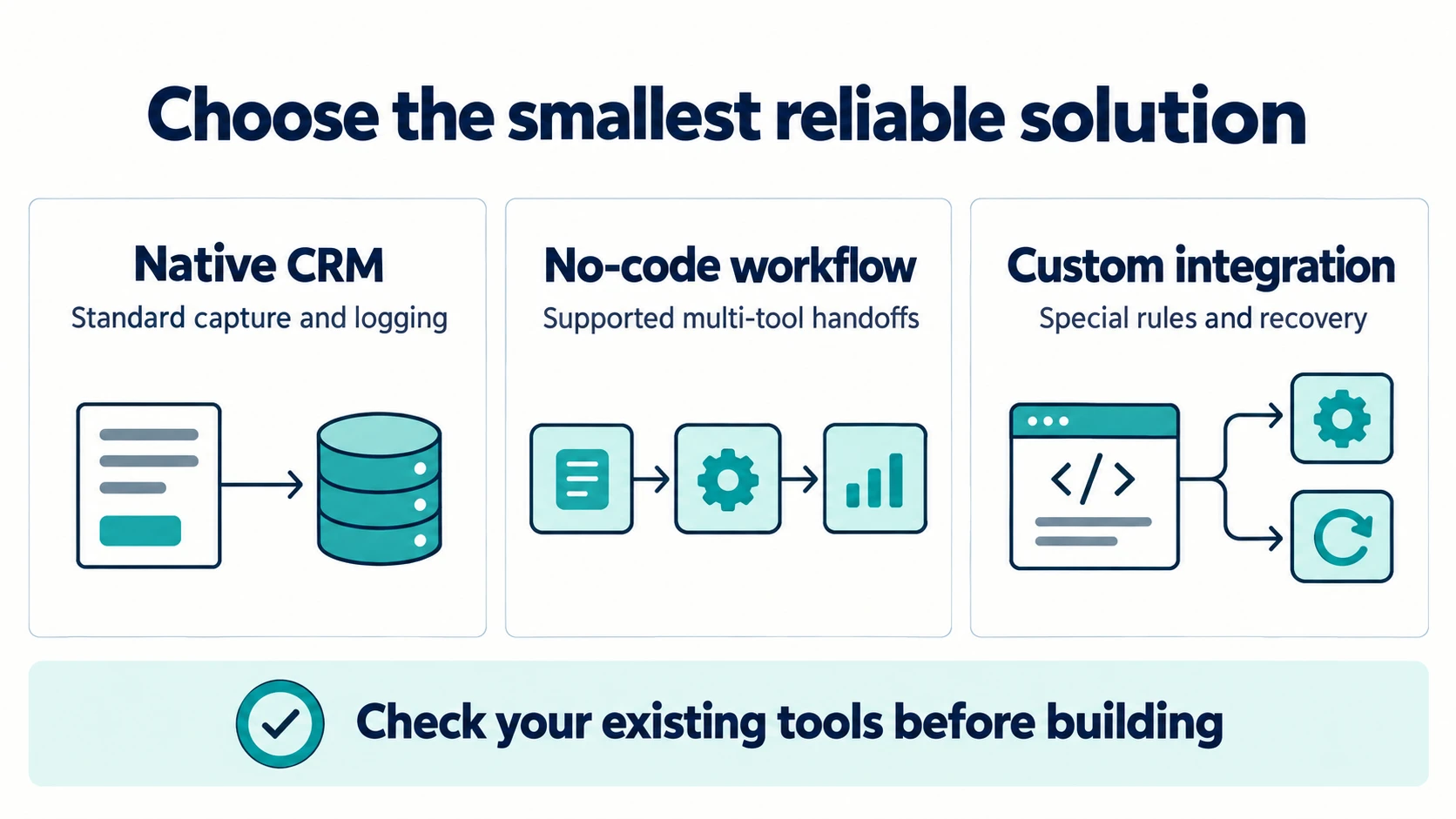
| Approach | A sensible starting point | What to verify |
|---|---|---|
| Native CRM features | Standard forms, supported email logging and simple assignment | Required fields, update behaviour, permissions and subscription availability |
| No-code workflow | A supported handoff between two or three tools | Duplicate handling, retries, task history and exception alerts |
| Custom integration | Unusual approval rules, multiple sources or recovery requirements | Ownership, tests, operational visibility and maintenance |
Start with what your existing tools already provide. For example, HubSpot documents email logging through its supported connected-email tools. Check the setup and limitations before commissioning a replacement.
No-code is not automatically unreliable, and custom code is not automatically better. A maintained connector that matches the process can be a better choice than an unnecessary backend. Custom engineering earns its place when the business has rules that a connector cannot express or failures that staff cannot recover from.
If you are choosing the implementation platform, my n8n, Zapier and custom-software comparison explains that decision in more detail.
A worked example: website enquiry to an owner task
Consider an illustrative property-maintenance business. Its form collects a service, a contact method, a location and a short description. Staff currently copy those fields, search for the customer, open a new opportunity and remind a colleague to call.
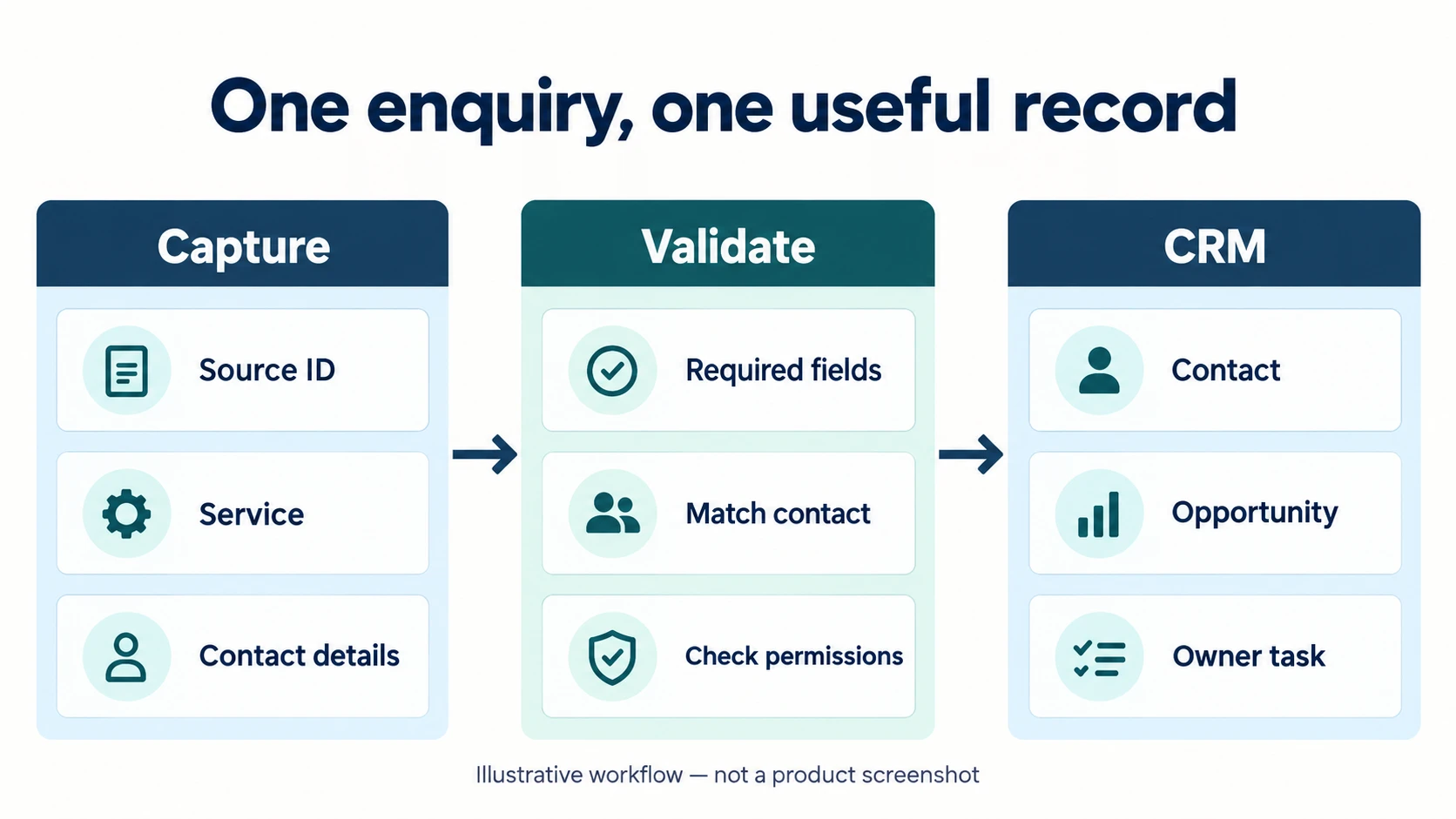
The proposed workflow is:
- Accept the submission and assign a stable source identifier.
- Validate required fields and the selected service.
- Resolve the contact using the business's matching policy.
- Create or update the enquiry associated with that submission.
- Assign an owner and create one next-action task.
- Record the result so a retry does not repeat the work.
This is a design example, not a claim about a deployed client system or measured revenue improvement.
Define a small field contract
| Source field | Destination | Rule |
|---|---|---|
| Form submission ID | Integration source reference | Required; retained across retries |
| Customer email | Contact email | Validate format; apply the CRM's supported matching policy |
| Service choice | Opportunity service | Map only to approved values |
| Service location | Opportunity location | Flag missing or out-of-area requests |
| Customer description | Source note | Keep the original; do not replace it with an AI summary |
| Preferred contact method | Contact preference | Do not interpret it as permission for unrelated marketing |
| Landing page | Enquiry source | Preserve attribution without copying it into every field |
| Assigned owner | Follow-up task owner | Use a documented assignment rule |
Keep the original source reference even if you retain only a limited copy of the message. It gives the person reviewing a record a way to check what was actually submitted.
Do not confuse contact matching with duplicate delivery
There are two different questions:
“Have I processed this submission before?” is about delivery identity. Use a source-system identifier, scoped to the correct account and source. A repeated delivery should not create a second opportunity or task. “Does this person already exist?” is about contact identity. The same person may send several legitimate enquiries. Those requests should not be discarded just because the email address matches.CRM-specific behaviour matters. HubSpot's deduplication guidance describes email-based contact matching and warns that company creation through APIs is not automatically deduplicated by domain. Do not assume a rule for a manual form also applies to every API operation.
Names alone are poor matching keys. Two people can have the same name, and shared inboxes may represent several people. When the identity is ambiguous, create a review task rather than silently merging records.
For a custom integration, enforce source-reference uniqueness in durable storage. A quick “search, then create” sequence can race when two deliveries arrive together. Also consider a worker timeout after the CRM has accepted a write: retrying safely requires a stable external reference or reconciliation, not just an in-memory processed flag.
Automate CRM data entry with AI where the input is unstructured
AI is useful when a customer writes: “We need someone to inspect a leak next week; afternoons are better.” A model can propose a service label, timing preference and a missing-information list.
It should not invent an address, turn “next week” into a guaranteed appointment, or decide that the lead has approved a quote. Use an extraction schema that permits unknown values.
For example, a draft extraction might be:
{
  "service": "inspection",
  "timing_text": "next week",
  "preferred_time": "afternoon",
  "confirmed_appointment": null,
  "missing_fields": ["service_location"],
  "requires_review": true
}
These are illustrative fields, not a provider API payload. The original message remains the evidence. Your application validates the proposed fields, applies its allowed-value rules and decides whether a person must review them.
For an executable starting point, download the small CRM capture-contract example and run it with Node.js. It demonstrates field whitelisting, a stable source reference and review reasons using synthetic data. It does not contact a CRM or provide durable duplicate prevention; those need the integration and storage layers described below.
Do not let text inside an enquiry become instructions to your integration. A sentence asking the system to export contacts or change payment details is customer content, not authority to execute that action. The model should receive only the context necessary for the extraction task and should not have unrestricted CRM access.
When to require human review
Review is appropriate when the request is incomplete, conflicting, sensitive, high-value or outside the supported services. A model's confidence number is not a guarantee of correctness; assess the actual fields and the consequences of a mistake.
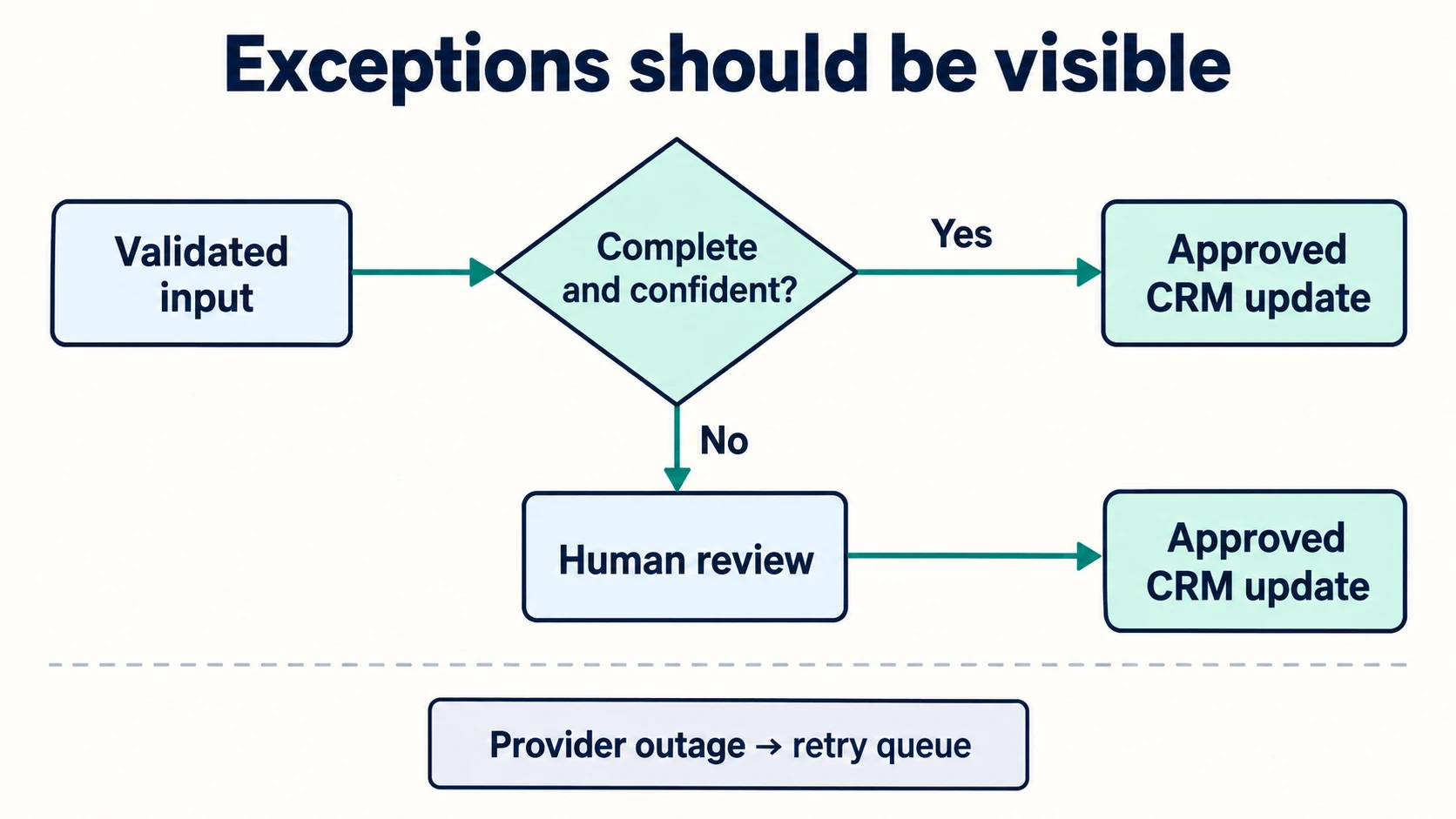
Separate business uncertainty from technical failure. A missing address needs a person or a clarification. An unavailable CRM needs a retry. Running the model again will not fix a provider outage.
A HubSpot implementation detail worth checking
If you use HubSpot, its Contacts API guide documents contact retrieval, updates and batch upserts. It also notes that partial upserts are not supported when email is the upsert identifier; a custom unique identifier is required for that partial-upsert case.
That distinction can affect a workflow that extracts just one field from a later message. Choose the supported operation deliberately rather than assuming every create-or-update request behaves like a partial patch.
Keep provider-specific code behind a small adapter. Your business workflow should describe “resolve contact” and “record enquiry”; it should not scatter provider property names, tokens and HTTP calls through every step.
Design the exception queue before switching automation on
A useful exception queue answers four questions: what failed, which source record it concerns, what has already succeeded, and who can resolve it.
| Failure | Safe next action |
|---|---|
| Missing required field | Request clarification or assign review |
| Possible contact mismatch | Review identity before merging |
| CRM rate limit | Follow provider guidance and retry later |
| Temporary provider outage | Retry with bounded backoff and the same source reference |
| Write succeeded but response was lost | Reconcile before creating again |
| Permission revoked | Stop repeated attempts and alert the owner |
Do not put full customer messages into routine error logs. Log a correlation identifier and a useful error classification; give authorised staff a controlled route to inspect the source.
Once processing succeeds, notify the owner with a link to the record, not a second unstructured copy that becomes another inbox to manage. If the owner must still retype the data, the integration has not completed its job.
A practical two-week pilot
Days 1–3: establish the baseline
Review a small, representative set of enquiries. Measure manual entry time, missing fields, duplicate opportunities and the delay before owner assignment. Distinguish entry work from the human assessment that still needs to happen.
Days 4–7: configure one source
Agree on field mappings, identity rules, permissions and what should never be overwritten. Test with synthetic records. Keep outbound customer communication separate from CRM capture.
Days 8–10: test failures
Submit the same source record twice. Send a second legitimate request from the same contact. Simulate missing fields, a timeout and a revoked credential. Confirm that each result is visible and recoverable.
Days 11–14: launch with supervision
Use a limited share of new enquiries. Let staff compare source and destination records. Keep a manual fallback until the exceptions are understood. Expand only after the owner can explain why a record was created or updated.
Measure useful work, not just automation runs
Track minutes spent on entry, the share of enquiries with complete required fields, duplicate opportunity rate, time to owner assignment and the number of corrections. Then connect those operational measures to qualified conversations and booked work.
An illustrative calculation can help scope the pilot: 30 enquiries per week multiplied by three minutes of retyping is 90 minutes of entry work. Those numbers are hypothetical. Measure your own volume and effort, then include review time and maintenance costs before claiming savings.
The strongest result may be better context for the first call rather than a dramatic reduction in hours. Do not promise that adding AI will automatically increase sales.
Frequently asked questions
How do I automate data entry to my CRM?
Start with one source, such as a website form. Map required fields, define contact matching and submission identity, and connect the CRM through a supported native feature, automation connector or API. Add visible exception handling before expanding.
Can AI automate CRM data entry from emails?
AI can extract proposed fields from emails and call notes. Keep the original source, allow unknown values and validate the extraction. A person should review ambiguous or consequential updates.
Will automatic CRM capture eliminate duplicates?
Not by itself. You need separate policies for duplicate deliveries, existing contacts and legitimate new opportunities. Test the CRM's behaviour for the exact operation your integration uses.
Do I need to replace my CRM?
Usually that is not the first step. Check its native forms, email tools and integrations. A small improvement to the capture process may solve the problem without a platform migration.
Should the workflow send follow-up messages automatically?
Capture and sending are different decisions. Start by creating an owner task. Add customer-facing automation only with an appropriate communication process, clear stop conditions and review rules. My contractor follow-up guide covers that handoff.
Choose the smallest workflow that removes retyping
The goal is a useful record with a responsible owner, not the largest possible automation graph. Native capture, clear identity rules and visible exceptions are the foundation. AI becomes helpful when it reduces language-heavy work without replacing evidence or judgement.
If your team still copies enquiries between an inbox and a CRM, explore my AI automation and integration services, or book a free consultation to map one handoff. For attendee-specific workflows, see event data CRM integration.