
AI CRM Integration for Small Business: Connect Forms, Email, Calendar, and Follow-Up
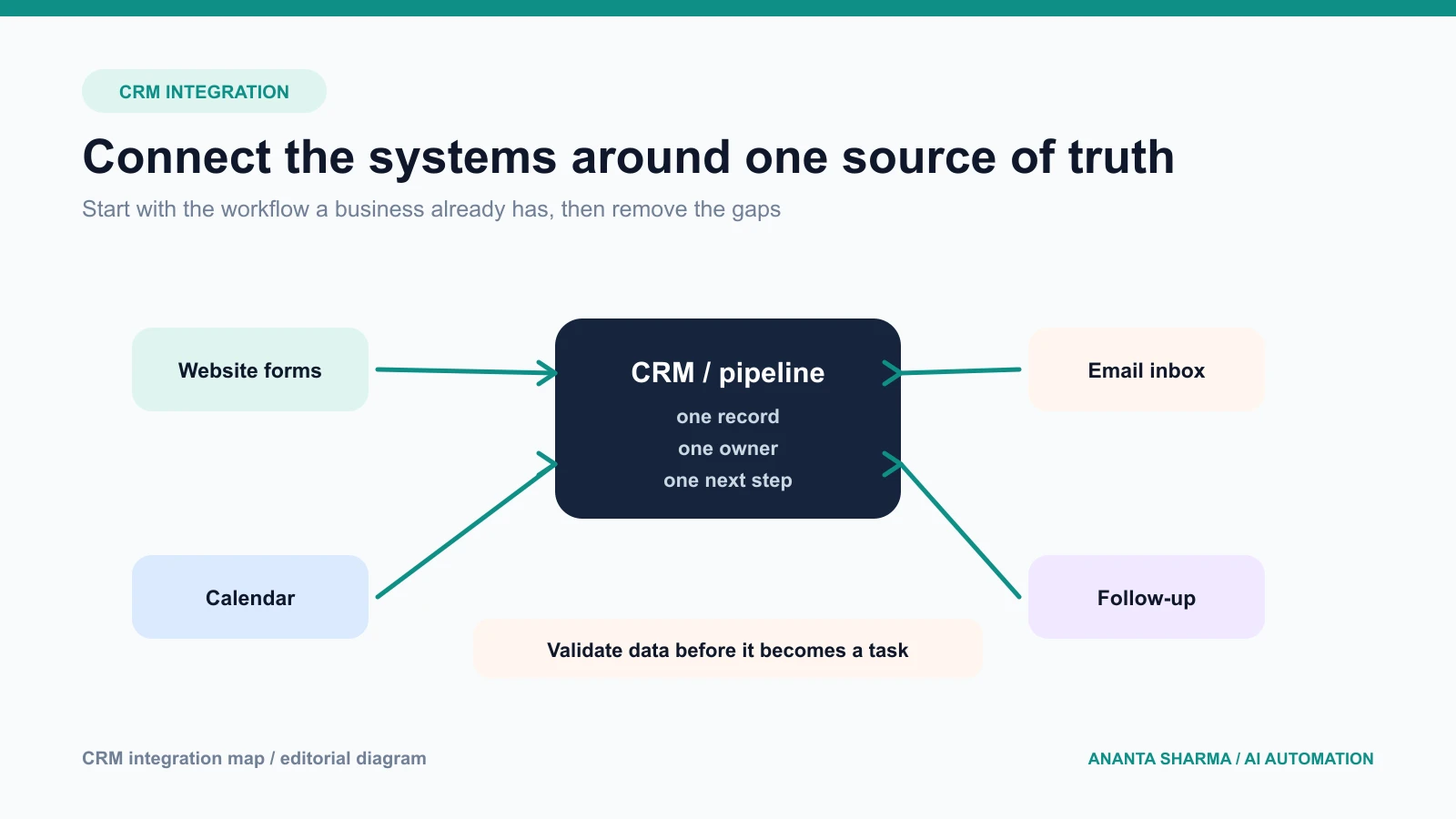
Many small businesses already have the tools they need to manage customer work. A website captures enquiries, Gmail receives questions, a calendar holds appointments, and a CRM or spreadsheet tracks opportunities. The problem is that the tools do not share enough context.
AI CRM integration for small business is not about giving an AI system unrestricted access to every record. It is about connecting the existing workflow so information arrives in the right place, missing details become visible, and AI helps with the language-heavy work around a reliable backend.
This guide explains how to connect forms, inboxes, calendars, and follow-up without losing ownership, privacy, or control.
What a small business CRM integration should solve
Start with one measurable gap:
- website enquiries are not assigned quickly;
- email leads are copied into the CRM by hand;
- appointments are booked without the right context;
- the owner cannot see which quotes need a follow-up;
- duplicate contacts appear across tools; or
- staff spend time summarizing the same customer history.
The integration should improve one of those outcomes before expanding. A “connect everything” project creates more moving parts before the business knows which handoff matters.
The role of AI in CRM integration
Traditional integration moves structured data between systems. AI is useful when the input is a free-text email, a call note, a document, or a customer request that needs interpretation.
Good AI-assisted CRM tasks include:
- extracting service, location, and timeline from an enquiry;
- summarizing a thread before a sales call;
- classifying a lead by service or urgency;
- suggesting the next task based on approved rules;
- drafting a follow-up from the actual conversation; and
- finding missing information before a quote is prepared.
Keep CRM writes, permissions, deduplication, scheduling, and business rules in tested application code. The model can propose a structured result; the server decides whether it is valid and what it is allowed to change.
A simple architecture that stays understandable
A dependable integration usually has five layers:
- Capture: receive a form submission, inbox event, or booking change.
- Normalize: validate fields, files, timestamps, and source identifiers.
- Domain record: create or update the contact, opportunity, task, or appointment.
- AI assistance: classify, summarize, extract, or draft using only approved context.
- Human action: review, approve, edit, schedule, or escalate.
The layers matter because a model outage should not erase a lead and a CRM outage should not cause a customer message to be sent twice. Each step should be observable and retryable at the right boundary.
Connect the website form first
The website is often the cleanest place to start because the business controls the form and can define the fields. Send the submission to a server endpoint, validate it, and store an idempotency key before calling external providers.
At minimum, the server should:
- validate the contact fields and message length;
- enforce file size and file type limits;
- preserve the landing page and campaign source;
- create or match a CRM contact;
- create an opportunity with a clear service label;
- assign an owner or queue; and
- create a next-action task.
If the CRM is unavailable, store the validated request and show the owner a retryable error. Do not make the customer submit the form again without explaining what happened.
Connect the inbox without duplicating conversations
Email is where many qualified leads already arrive. A useful CRM integration identifies new enquiries, attaches them to the right contact, and preserves the thread. It should distinguish a new opportunity from a reply to an existing one.
Use the provider’s message ID or thread ID when available. Normalize the sender address, but do not use an email address as the only identity signal when the business has multiple contacts or shared inboxes. Keep the original message reference, subject, and received time so a person can open the source conversation.
AI can summarize a long thread or identify missing details. It should not silently send a reply because a draft was generated. Let an owner review customer-facing communication when the request is ambiguous, high-value, sensitive, or outside the approved templates.
Connect the calendar around a real business rule
Calendar integration is useful when an appointment is a meaningful next step, not simply because the API exists. Before writing a booking, check service area, staff availability, travel time, appointment type, and timezone.
The CRM should store the appointment ID and the source timezone. If a customer changes or cancels the event, update the opportunity and task instead of creating a second record. If the calendar write fails, show the owner an actionable recovery path.
Use a small data contract
The most common integration failures are not dramatic outages. They are small mismatches: a service value with two spellings, a missing timezone, a duplicate contact, or an attachment that cannot be opened later.
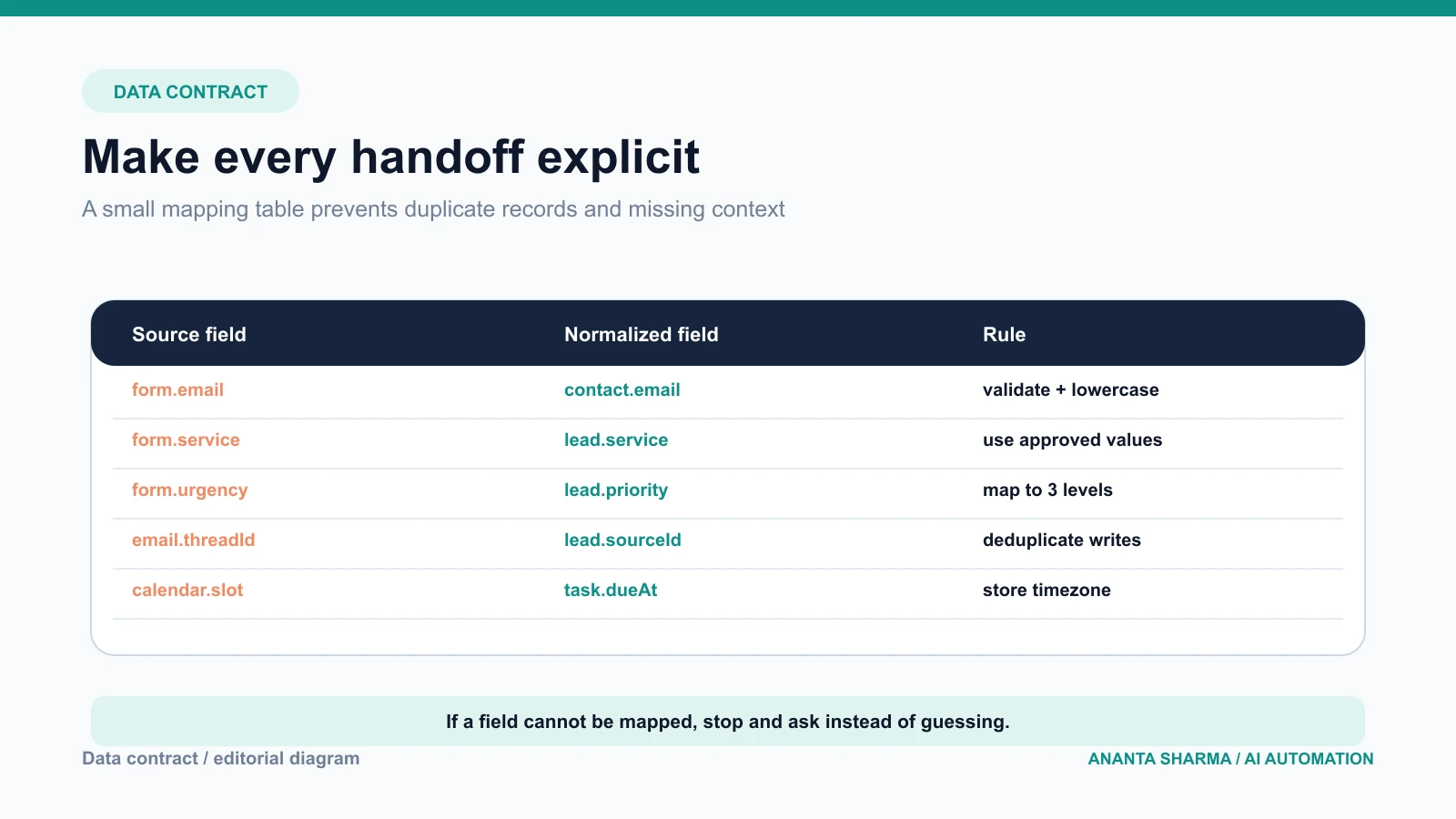
Define the fields that cross the boundary and the rule for each one:
- which source owns the value;
- which values are allowed;
- whether the field is required;
- how it is normalized;
- how it is validated;
- what happens when it is missing; and
- whether it can trigger an external side effect.
For example, form.urgency may map to lead.priority with only three allowed values. email.threadId may map to lead.sourceId and must be unique. calendar.slot should include a timezone before it becomes a task deadline.
Prevent duplicate and unsafe writes
Use idempotency keys for form submissions, provider event IDs for webhooks, and unique constraints where the data store supports them. Separate read, draft, and write tools. A model that can search a CRM does not automatically need permission to update it.
For high-impact actions, use an approval record that stores:
- the proposed action;
- the source data used;
- the model or rule that proposed it;
- the person who approved or edited it;
- the time and timezone; and
- the final provider response.
This makes the system explainable when a customer asks what happened or an owner needs to correct a record.
Measure the integration by business movement
Track more than API success counts:
- time from enquiry to assigned owner;
- percentage of new leads with complete fields;
- duplicate contact and opportunity rate;
- time saved on thread summaries or data entry;
- appointment show or cancellation rate;
- quote follow-up completion; and
- qualified lead to proposal or booked-work conversion.
Keep a baseline before launch. If a workflow only reduces clicks but does not improve response time, data quality, or booked work, it may not be the right first investment.
A staged rollout for AI CRM integration
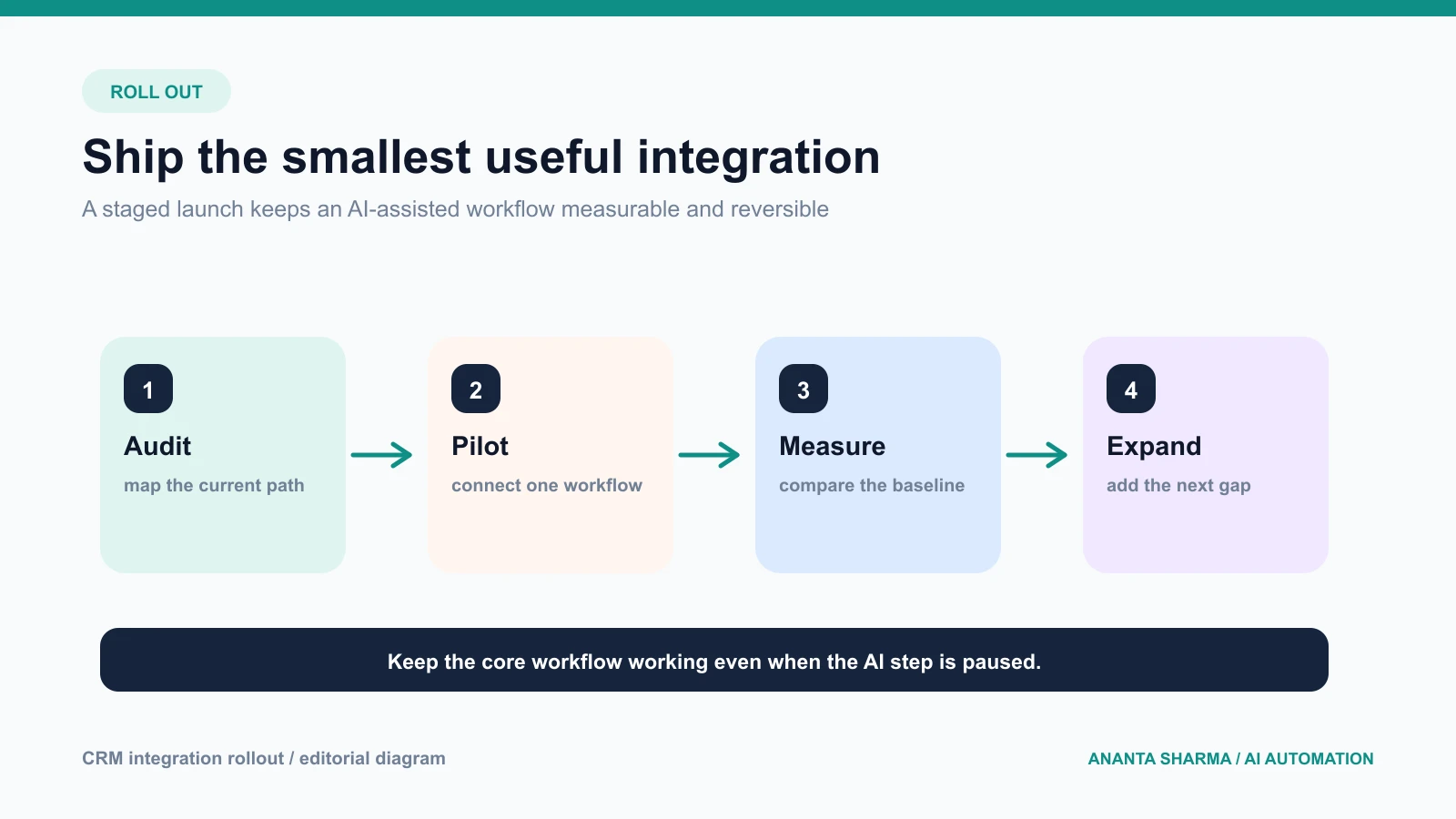
Stage 1: audit
Review the last month of enquiries, CRM records, calendar events, and follow-up tasks. Identify where context is lost and where staff repeat the same work.
Stage 2: pilot one source
Connect the website form or shared inbox to one pipeline. Add validation, deduplication, ownership, and a visible next action. Keep the AI part read-only or draft-only at first.
Stage 3: measure and harden
Replay real examples, test duplicate events, simulate provider failures, and review model corrections. Add alerts, retries, audit records, and a manual fallback.
Stage 4: expand carefully
Add calendar actions, approved follow-up, document extraction, or a second intake channel only after the first workflow is reliable. Keep the core record and permissions stable as new capabilities are added.
Buy, configure, or build?
Use a standard CRM integration when the business process matches the product and the provider exposes the needed fields and events. Configure a workflow tool when the path is simple and the team can own the exceptions. Build a custom backend when the business needs a specific data model, multiple providers, photo or document intake, approval boundaries, or a workflow that must remain portable.
The question is not whether custom software is more impressive. It is whether the integration will be easier to test, monitor, and change over time. A small, explicit backend can be less expensive to operate than a collection of fragile recipes once the business has several channels and exceptions.
What to ask an integration consultant
Ask for a diagram of the current and proposed flow, the fields that move between systems, the permission boundaries, the failure and retry behavior, and the metrics that will prove value. Ask how the system handles duplicate messages, provider outages, customer opt-outs, and a request for human help.
Be cautious of proposals that promise a fully autonomous sales or support agent without explaining data ownership, approval, privacy, and rollback. A professional integration makes the next action clearer even when the AI step is disabled.
If you need help connecting a website, inbox, CRM, calendar, or AI workflow, you can book an AI automation consultation. My AI automation service focuses on practical integrations, backend validation, and measurable workflow pilots.
Frequently asked questions
What is AI CRM integration?
It is a CRM connection that uses AI for narrow tasks such as classification, extraction, summarization, or drafting while normal application code controls records, permissions, and external writes.
Can AI connect my website forms to a CRM?
Yes, when the CRM has a suitable API or automation endpoint. The integration should validate the form, prevent duplicates, preserve the source, assign an owner, and create a next action.
Should email replies be sent automatically?
Only when the message is low-risk, the business has an appropriate communication process, and the approved rules are clear. Keep ambiguous, high-value, sensitive, and unsolicited messages behind review.
How do I keep customer data safe?
Minimize data sent to models, use least-privilege credentials, validate files, restrict access, keep operational records separate from analytics, and define retention and deletion processes.
What is the best first CRM automation?
Choose the handoff that currently loses the most time or context: website lead assignment, inbox-to-pipeline capture, quote follow-up, or appointment coordination. Measure it before adding more automation.
The practical takeaway
AI should make the CRM workflow more useful, not more mysterious. Connect one source, define a small data contract, validate every write, keep a person in control of meaningful actions, and measure movement from enquiry to booked work. That is the foundation for an integration a small business can trust and improve.