
AI Lead Follow-Up Automation for Contractors: From Quote to Booked Job
Most contractors do not lose work because they cannot deliver it. They lose work in the quiet gap after an enquiry or quote: a customer is waiting for an answer, the owner is on a job, and the next follow-up lives in someone’s memory.
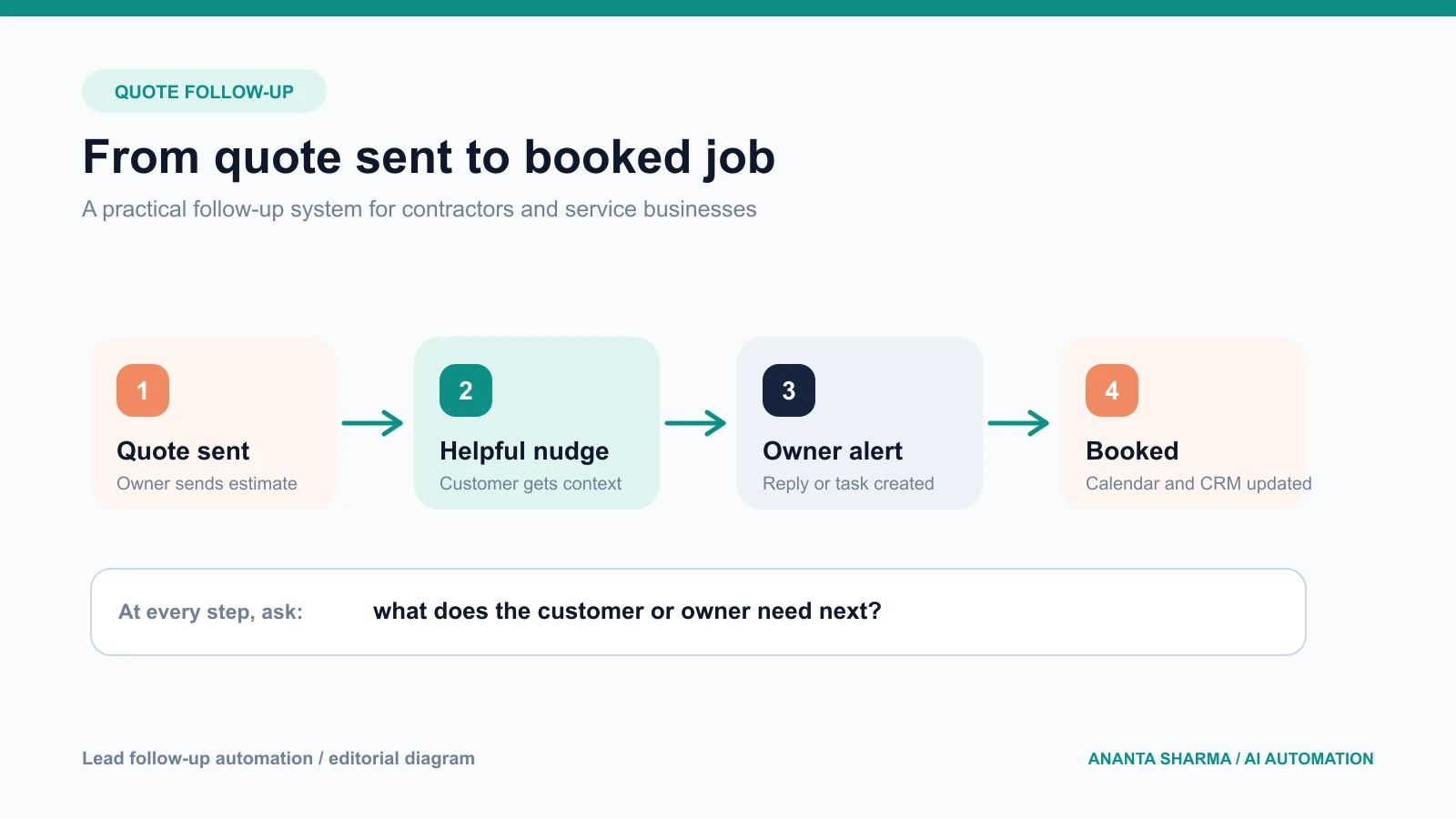
AI lead follow-up automation for contractors closes that gap without turning customer communication into a robotic blast. The useful version is a small workflow that captures the right context, records when a quote was sent, reminds the team when a response is due, and prepares a helpful message for review.
This guide explains how to design quote follow-up automation for roofing, remodeling, HVAC, plumbing, electrical, landscaping, cleaning, and other service businesses. The goal is not “send more messages.” It is to make every qualified lead have a clear owner and a clear next action.
What contractor follow-up automation should actually do
A practical workflow usually has five jobs:
- Capture the enquiry with service, location, urgency, contact details, and useful evidence.
- Create one structured record instead of leaving the request in a form inbox or spreadsheet row.
- Record the quote, estimate, or proposal event with a timestamp.
- Schedule a relevant follow-up based on the job stage.
- Give the owner a short summary and an approve, edit, or skip choice before a customer-facing message is sent.
The business outcome is a shorter response time and fewer forgotten estimates. A CRM is helpful, but the first improvement can be as simple as connecting a website form, an inbox, a task list, and a calendar around one lead record.
Why quote follow-up is different from ordinary email automation
An abandoned ecommerce cart and a contractor estimate are not the same problem. A service quote often depends on photos, measurements, property access, material choices, weather, location, and the customer’s timing. The follow-up needs to acknowledge that context rather than repeating “just checking in.”
Good quote follow-up answers one of these questions:
- Did the customer receive the estimate?
- Is any information missing before the team can proceed?
- Has the customer chosen a time to discuss the work?
- Is the job still active, delayed, or no longer relevant?
- What should the owner do next?
That is why contractor lead follow-up software should be treated as a workflow design project, not only a sequence of templates. A message is useful when it is attached to the right stage, has the right context, and stops when the customer replies.
A reliable workflow from enquiry to booking
1. Capture the information that changes the next step
Keep the first form easy to complete, but ask for the details that affect triage. For many contractors that means service type, location, urgency, preferred contact method, and a photo or document when it is genuinely useful. Do not ask for every possible detail before a person has shown interest.
When a request arrives by phone or email, the same fields can be added by a team member or extracted into a draft record. Missing fields should become a clear follow-up question, not an invented assumption.
2. Normalize and deduplicate the lead
The system should validate the email, phone, service, and location, then check whether the contact already exists. A customer who sends a second photo should not become a second opportunity. Store the original source, the latest message, and the next action separately.
Useful fields include:
- lead source and landing page;
- service requested and service area;
- urgency and preferred date;
- contact details and consent status;
- photo or document references;
- quote amount and quote date;
- current stage, owner, and next follow-up date; and
- last customer reply.
3. Send the quote with a visible next step
A quote should tell the customer what happens next: reply with a question, choose a time, confirm a site visit, or approve the work. If there is no next action, follow-up becomes vague. The CRM or task system should record the quote event so the workflow knows when the next touch is due.
4. Follow up with context
The first follow-up can confirm receipt and make it easy to ask a question. A later follow-up can mention the scope, the information still needed, or the next available step. AI can draft the message from approved fields, but the application should control what information is allowed into the draft.
Avoid making unsupported claims about availability, price, warranties, or urgency. If the owner has not approved a detail, the system should leave it out or ask for review.
5. Stop when the lead changes state
The workflow must stop after a reply, booking, explicit decline, or do-not-contact request. A follow-up system that continues after the customer has answered creates a poor experience and can damage trust. Every outbound step needs an exit condition.
What AI is good at in contractor follow-up
AI is helpful when the input is messy or the message needs a little context. It can:
- classify an enquiry by service and urgency;
- extract a location, requested date, and missing details;
- summarize a phone note or email thread;
- suggest the next workflow state;
- draft a short, human-sounding reply from approved information; and
- flag leads that need a person quickly.
AI should not decide final pricing, invent scope, promise a completion date, approve a discount, or send a high-impact message without an appropriate review rule. Keep deterministic validation, permissions, scheduling, and CRM writes in normal application code.
A simple quote pipeline for a small team
Use a small number of visible stages instead of creating a stage for every possibility:
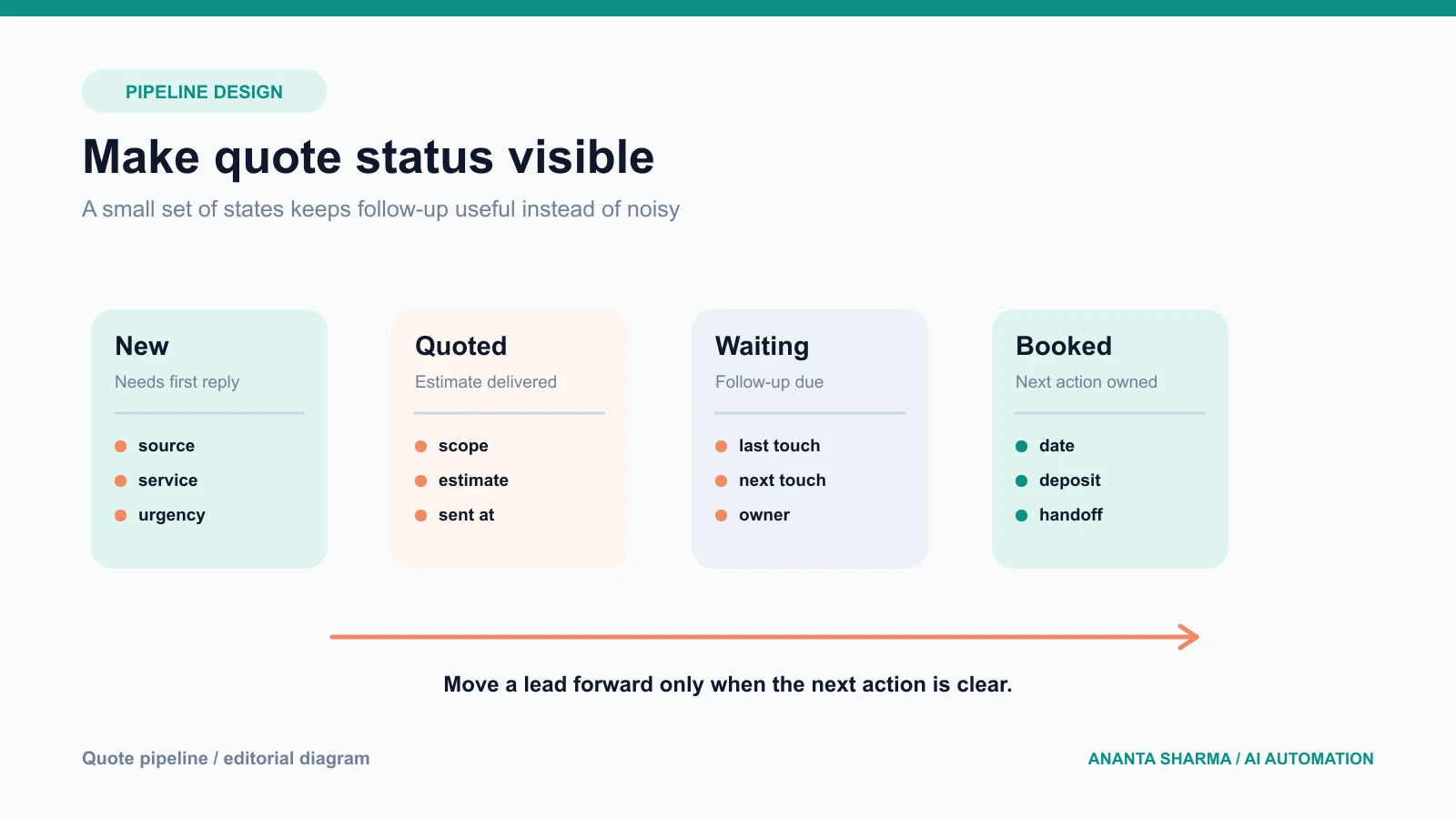
- New: the request needs a first response or qualification.
- Quoted: an estimate or proposal has been sent.
- Waiting: the customer has not replied and a next touch is scheduled.
- Booked: the customer has selected a date or accepted the next step.
- Closed: the work is won, lost, paused, or explicitly declined.
Every stage should have an owner, a last-touch date, and a next action. If a lead has no next action, it is not really in a managed pipeline.
The integrations that matter most
Start with the tools the business already uses:
- website form or landing page for capture;
- shared inbox for email enquiries;
- CRM, spreadsheet, or lightweight database for the record;
- calendar for site visits and calls;
- SMS or email provider for approved notifications; and
- file storage for photos, plans, and documents.
Use webhooks when a provider can notify the system that something happened. Use APIs for known reads and writes. Use AI only where classification, extraction, summarization, or drafting adds value. This keeps the system easier to test and replace.
Metrics that show whether it is working
Do not measure success only by messages sent. Track the handoff:
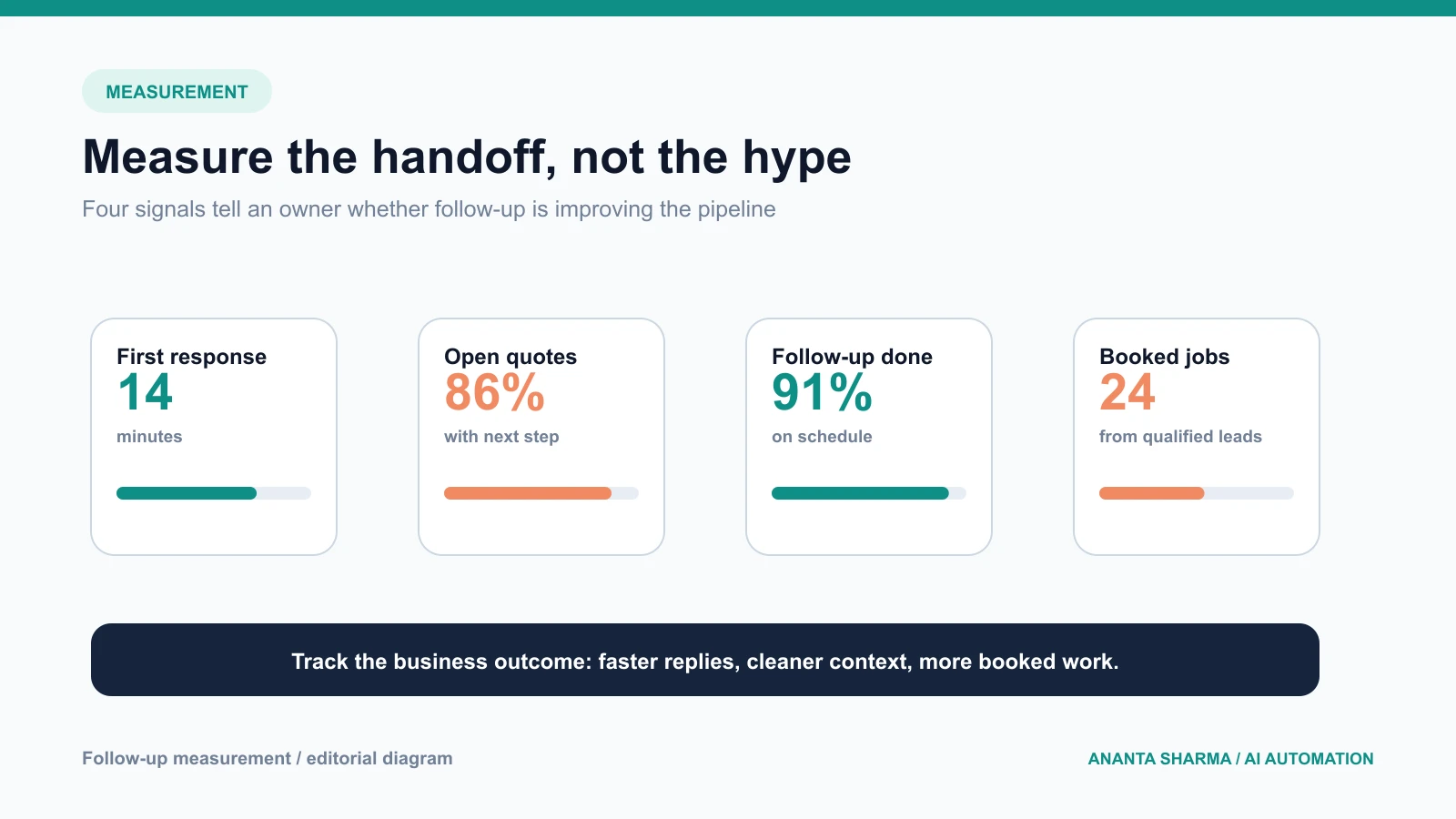
- time from enquiry to first human response;
- percentage of qualified leads with a next action;
- percentage of quotes with a completed follow-up;
- duplicate lead rate;
- customer reply rate;
- booked jobs from qualified leads; and
- manual corrections or escalations.
The baseline matters. If the owner currently responds within an hour, automation should not make the experience slower just because it added more steps. If a team is missing enquiries because nobody owns the inbox, a small amount of structure may create more value than a complex agent.
A safe 30-day pilot
Week 1: map the current process
Review the last twenty enquiries. Record where each one arrived, what information was missing, how long the first response took, and what happened after the quote. Choose one service line or location for the pilot.
Week 2: define the data and rules
Choose required fields, pipeline states, follow-up timing, stop conditions, and approval boundaries. Write down what the system must never promise or send without review.
Week 3: connect and test
Connect one intake source, one record system, and one outbound channel. Test duplicate submissions, missing photos, invalid phone numbers, customer replies, provider timeouts, and opt-outs.
Week 4: launch with review
Start with a small share of new enquiries. Review drafts, corrections, response times, and booked outcomes. Keep a manual fallback and expand only after the workflow is predictable.
When to build instead of buy
Off-the-shelf contractor CRM software can be a good fit when the process matches its assumptions. Custom engineering becomes useful when the business already has a website, CRM, inbox, calendar, or field-service system that does not connect cleanly, or when the workflow needs photo intake, custom approval rules, or a specific reporting model.
If you are comparing tools, ask whether the system can stop follow-ups after a reply, preserve the source record, prevent duplicate writes, export your data, and show the owner why a message was drafted. Those details matter more than a long list of AI features.
If your team is losing time between enquiry, estimate, and booking, I can map the smallest useful workflow across your existing tools through an AI automation consultation. You can also review the AI automation service for service businesses before deciding whether the first step should be a form improvement, CRM integration, or follow-up pilot.
Frequently asked questions
What is the best first automation for a contractor?
Start with lead intake and quote follow-up. It is close to revenue, happens repeatedly, and can be measured without giving an AI system authority over pricing or contracts.
Can AI send contractor follow-up emails automatically?
It can prepare or send narrow messages when the business has a suitable consent and communication process. Keep pricing, promises, sensitive situations, and uncertain requests behind human review.
Do I need a CRM to automate quote follow-up?
Not always. A structured spreadsheet or small database can work for an early pilot, but a CRM becomes more useful as multiple people, locations, services, or follow-up stages are involved.
How long should a follow-up sequence be?
The right timing depends on the service and customer expectation. Define a small sequence, stop after a reply or decline, and review the data instead of copying a generic cadence across every job type.
What should I ask an automation consultant?
Ask what will be automated, which decisions remain human, how duplicates and failures are handled, what data is stored, and how success will be measured. A credible pilot names one workflow and one outcome.
The practical takeaway
Contractors do not need more noise in the inbox. They need a dependable path from enquiry to quote to next action. A well-designed AI lead follow-up workflow captures context, keeps the pipeline visible, drafts useful communication, and leaves the owner in control of the decisions that matter.