Event Data CRM Integration: Sync Registrations, Attendance, and Follow-Up
An event registration is not the same as attendance, and attendance is not the same as a qualified sales opportunity. If all three become a single “event lead” label in your CRM, the team loses the context it needs for a useful next conversation.
Event data CRM integration connects registration, attendance and relevant engagement records to your existing contacts, while preserving event identity, source attribution and contact preferences. A good integration removes repeated CSV work without turning every attendee into an automatic sales message.This guide is for B2B webinar teams, event organisers, agencies and startups. It uses an illustrative workflow, not a fabricated client case study. For general form and inbox integration, start with my small-business CRM integration guide.
What event data should reach the CRM?
Start with the decision the team needs to make after the event. Does an owner need to call someone who requested a demo? Should an attendee receive the materials they asked for? Does an organiser need to reconcile cancelled registrations?
Those decisions need more than an email address:
| Field | Why it matters |
|---|---|
| Source platform and account | Distinguishes records across providers or workspaces |
| Event identifier | Keeps separate events separate |
| Attendee or registration identifier | Identifies participation within the source system |
| Existing contact reference | Links the participation to the correct person |
| Registration status | Distinguishes registered, cancelled and other supported states |
| Attendance status and time | Records what actually happened, not what was expected |
| Relevant custom answers | Preserves useful context from the registration form |
| Campaign/source reference | Supports attribution without rewriting contact history |
| Communication preferences | Helps determine which next actions are appropriate |
| Last source update | Helps resolve late or conflicting deliveries |
Do not copy every collected field simply because an API returns it. Some event data is operational rather than useful for a sales conversation. Define which fields belong in the CRM, which remain with the event platform and how long either system should retain them.
Keep contact identity separate from participation
One person can attend several events. The CRM needs to represent both the person and each participation, rather than repeatedly overwriting a single “last event” field and losing the history.
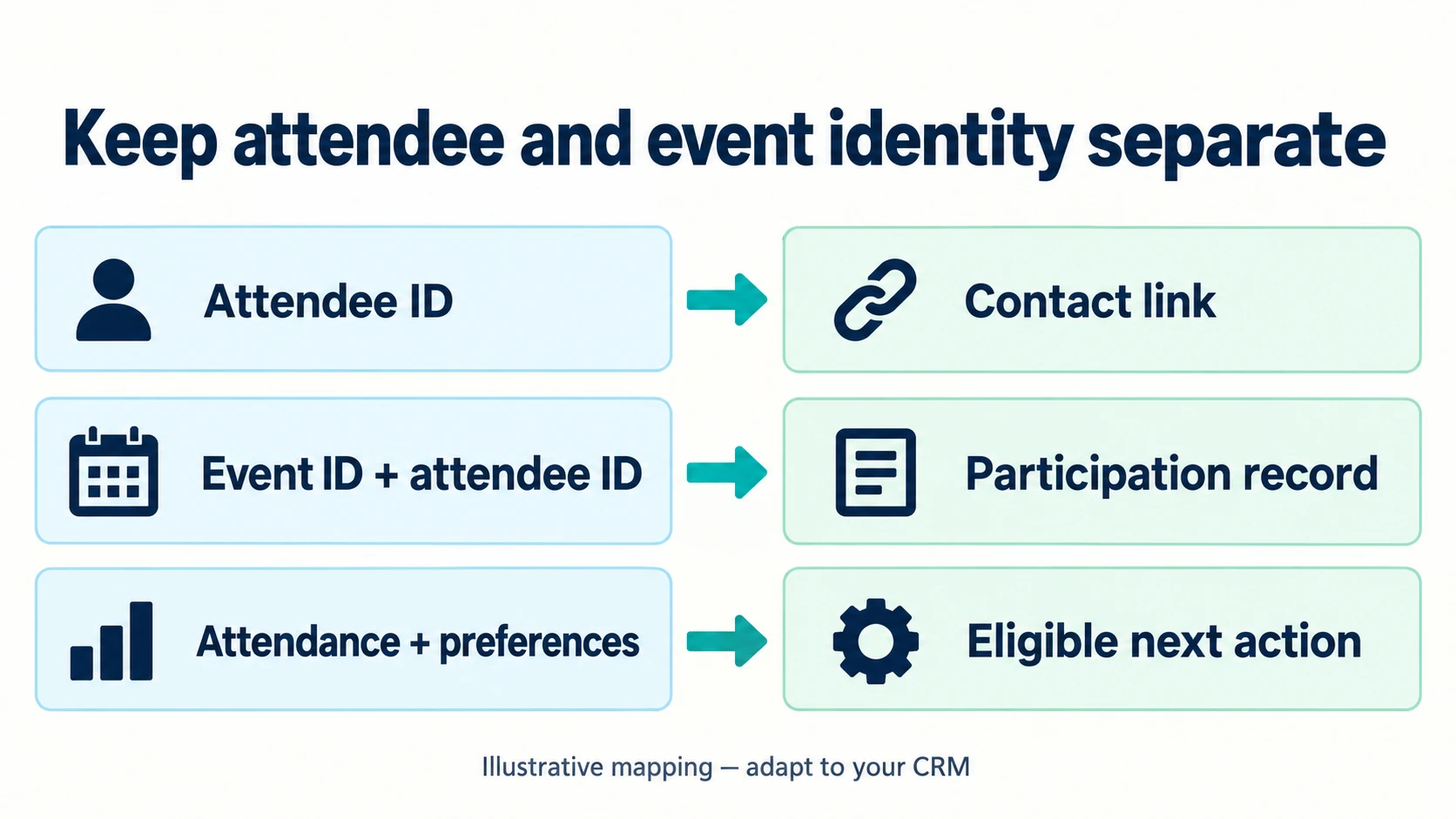
A practical model has three layers:
- Contact: who the person is and the identifiers used to resolve their record.
- Participation: which event they registered for and their current status.
- Next action: what the owner should do, based on relevant context and preferences.
Your CRM may support event objects, activities or another suitable representation. Verify what is supported in your account before designing a custom object. A lightweight external participation table can also preserve history while the CRM receives only the useful summary and links.
The identity might be scoped as platform + account + event_id + attendee_id. Check the provider's actual identifier semantics. Do not assume that a registration number is globally unique across every event or workspace.
Native connector, no-code, or custom event integration?
Choose based on the required data and recovery behaviour, not on the number of logos in an integration directory.
| Option | Best fit | Test before relying on it |
|---|---|---|
| Native connector | A standard supported event-to-CRM flow | Attendance updates, custom fields, existing contacts and cancellation behaviour |
| No-code workflow | Supported triggers plus straightforward mapping | Delivery identity, run history, retries, permissions and owner alerts |
| Custom API/webhook integration | Special mapping, several sources or stronger reconciliation | Durable capture, conflict rules, idempotency and maintenance ownership |
| Controlled CSV import | Low-volume, occasional events | Field mapping, identifiers, suppression handling and an audit trail |
A carefully controlled import can be a reasonable first step. Automation is most useful when repeated exports introduce delays, errors or missing context. It is not a requirement for every one-off workshop.
For example, the HubSpot Eventbrite marketplace listing describes registration events appearing in the contact timeline after an event is synced. That is a specific documented capability, not a promise that every custom answer or every status will map exactly as your team expects. Test your actual fields and account configuration.
For a broader platform decision, see n8n vs Zapier vs custom software.
A worked example: webinar registration to owner follow-up
Imagine a B2B team running a webinar about a product integration. Its form asks for company role and whether the person wants a technical discussion. Afterward, the team needs to distinguish attendees who requested help from people who only wanted the presentation.
The proposed lifecycle is:
- Registration creates or updates a participation record linked to the contact.
- Attendance updates that participation, not a new contact.
- A documented qualification rule checks relevant answers and current preferences.
- The rule assigns an owner task where appropriate.
- A person reviews the context before a sales conversation or consequential message.
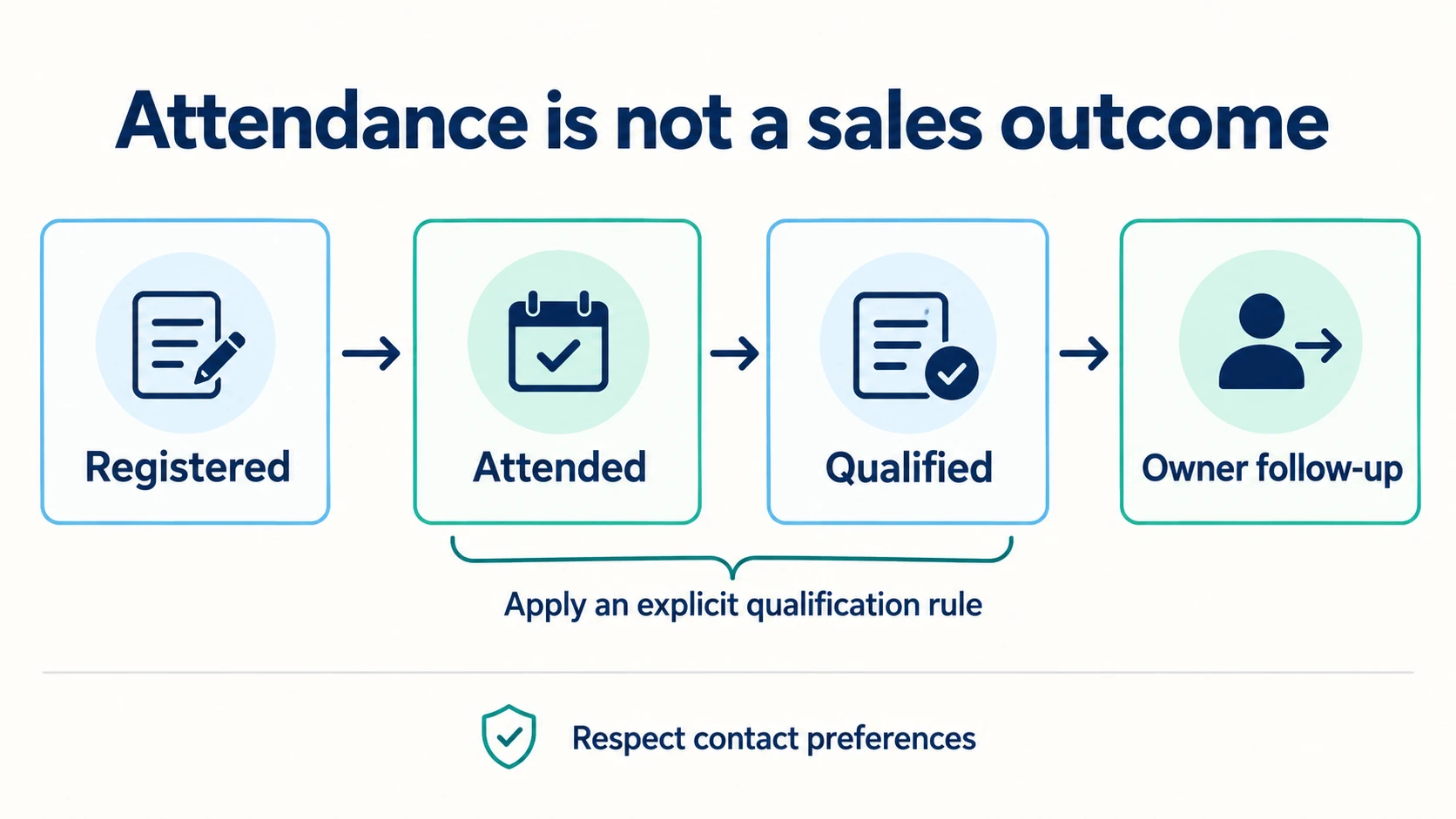
“Registered → attended → qualified → owner follow-up” is an illustrative path, not a rule that every registrant must pass through. Some people cancel. Some attend without asking for contact. Some request a conversation without attending. Store these facts independently rather than forcing them into a misleading funnel.
Define the qualification rule before building the sync
For this example, “qualified for owner review” might mean that the person explicitly requested a technical discussion and the request is relevant to the team's services. It should not mean “their email address exists” or “an AI model thinks they look valuable.”
Write the rule so staff can explain why a task exists. Include exit conditions for cancellation, an objection, changed preferences or an existing open conversation. A returning attendee should not trigger an identical new task every time a platform retries its notification.
Map event fields deliberately
The most useful deliverable before implementation is a source-to-destination mapping sheet. It should identify not only where a value goes, but who owns it and what happens if it is missing.
| Source value | Example destination | Missing/conflicting value |
|---|---|---|
event_id | Participation event reference | Reject or review; do not guess the event |
attendee_id | Participation attendee reference | Use the provider's supported identity strategy |
status | Participation status | Map only recognised states |
checked_in_at | Attendance timestamp | Leave unknown if no confirmed attendance evidence exists |
requested_discussion | Review eligibility flag | Treat absence as unknown, not “yes” |
campaign_reference | Participation source | Preserve the original rather than replacing first-touch attribution |
updated_at | Source revision time | Apply a documented ordering/conflict policy |
These names illustrate a data contract; they are not claimed to be an Eventbrite, Zoom or HubSpot payload. Obtain a real sample from the chosen provider and confirm the exact property names before implementing.
Avoid collecting unrelated sensitive answers in a sales CRM. An accommodation request or dietary preference may have an event-operations purpose without belonging in a sales qualification record.
Webhooks notify; APIs read and write
A webhook lets one system tell another that something changed. An API lets your integration request a known operation or fetch a current record. A reliable event integration often uses both.
HubSpot's webhook documentation describes notifications sent as POST requests to the configured endpoint, with a successful response acknowledging receipt. Its examples include CRM synchronisation and notifications. Check each provider's authentication, delivery and retry contract separately.For your receiving endpoint, verify the source using the provider's documented mechanism, validate the envelope, and durably capture accepted work before acknowledging it. Acknowledging receipt is not the same as proving that every downstream CRM operation has finished.
Use an API read or controlled reconciliation job when the webhook does not provide enough context or when you need to detect missed updates. My MCP, API and webhook comparison explains the different roles. An agent protocol is not necessary for a predictable registration-to-CRM sync.
Prevent duplicates and incorrect status changes
Consider four cases before launch:
- The same registration notification arrives twice.
- The attendee already exists as a CRM contact.
- An attendance update arrives before a delayed registration notification.
- The CRM accepts a write, but your worker times out before seeing the response.
Each is a different problem. A unique delivery identifier helps with repeated notifications. A contact policy handles existing people. Source revisions or current-state reconciliation handle ordering. A stable external reference helps recover from an uncertain write outcome.
Do not merge two contacts merely because their names look similar. Do not let a late “registered” event erase confirmed attendance. Do not claim exactly-once delivery just because your queue rejects an identical job identifier.
For the contact layer, HubSpot's deduplication guide documents email matching and notes operation-specific differences. That still leaves your integration responsible for participation identity and task deduplication.
Make failed syncs recoverable
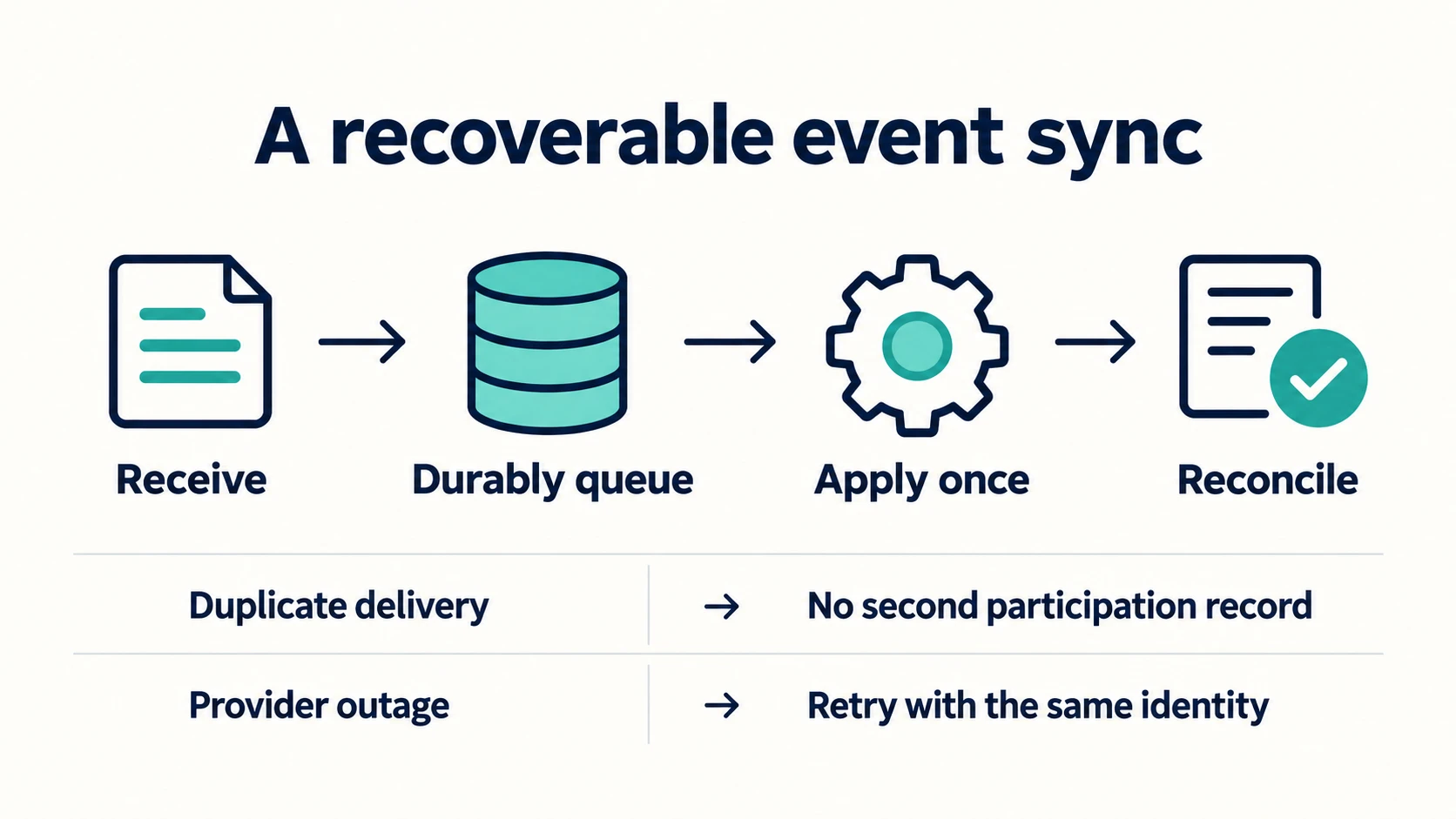
Maintain a small operational view with source reference, destination reference, last attempt, error category, applied steps and next action. An authorised owner should be able to distinguish “waiting to retry” from “needs a mapping decision.”
| Situation | Recovery approach |
|---|---|
| Unknown field value | Review mapping; preserve the source |
| Duplicate delivery | Reuse the existing participation result |
| Temporary CRM outage | Retry within a bounded policy |
| Rate limit | Follow provider guidance and reduce pressure |
| Lost acknowledgement after a write | Reconcile before creating again |
| Credential revoked | Pause and alert rather than retrying indefinitely |
Reconciliation compares the expected source state with destination state. It can reveal a record that never reached the queue, a rejected custom answer or a partial write. Define its scope and cadence based on event volume and urgency instead of polling every record constantly.
Attendance does not equal marketing permission
Treat contact preferences as part of the workflow, not an afterthought. Registration, event administration and subsequent marketing are different purposes. Record the wording and context of the preference collected, and have the business review its communication obligations for the relevant audience and jurisdiction.
Do not infer broad marketing permission from attendance alone. Keep suppression and objections visible to any system that could trigger messaging. A later source update should not silently turn an opted-out contact back into a marketable one.
This is a workflow-design principle, not legal advice. If you need a legal determination about a campaign, obtain jurisdiction-specific guidance before enabling it. The integration should support that decision, not make it on the organiser's behalf.
Where AI helps, and where it does not
AI can summarise a long question, propose a topic label or prepare a discussion brief. It should not decide that a person consented, invent an attendance record or change the source facts to make the funnel look stronger.
Keep extraction and summary separate from identity, status transitions and CRM writes. Store unknown values as unknown. For a small event, a deterministic mapping and a well-designed review task may be enough; an autonomous agent adds little value to a predictable sync.
Roll out with one event first
Before enabling every event, agree on a representative test set:
- A new contact registers with all required fields.
- An existing contact registers for a different event.
- The same notification arrives twice.
- A registrant cancels.
- Attendance arrives late or out of order.
- A custom field is missing or has an unexpected value.
- A person changes their communication preference.
- The destination is unavailable during an update.
Use synthetic attendees for initial testing. Compare source and CRM records field by field. Have an owner inspect tasks and confirm that no unexpected messages are sent. Keep the current export/import method available as a controlled fallback until the new flow is understood.
Measure completeness before celebrating automation
Measure participation coverage, required-field completeness, unresolved exceptions, duplicate records, sync delay and owner-task creation. Then measure relevant conversations and qualified opportunities using a clearly stated attribution model.
An event can influence a conversation without being its only cause. Preserve the difference between first-touch source, event participation and a sales outcome. Do not overwrite previous attribution just because the person attended your latest webinar.
You can assess the workflow even with modest event volume. A record-by-record check may tell you more than a dashboard percentage based on a handful of attendees.
Frequently asked questions
What is event data CRM integration?
It is the connection that links event registration, attendance and relevant engagement information to CRM contacts and follow-up processes while preserving event identity and preferences.
Can I use a native integration?
Yes, if it supports the fields, statuses and recovery behaviour your team needs. Test custom answers, cancellations, existing contacts and actual attendance before relying on a connector's name alone.
Should every event registrant become a new CRM contact?
Not necessarily. Resolve existing contacts using a documented policy, and decide which records need to be retained. Keep participation separate so repeat attendees do not become duplicate people.
Should every attendee receive a sales follow-up?
No. Use relevance, the person's request and the appropriate communication process to determine the next action. Attendance alone is not a qualification or permission rule.
Do I need AI for this integration?
Usually not for the core sync. AI can help with free-text summaries or categorisation, while normal application code controls identity, validation, preferences and writes.
Make event data useful to the next person
A good sync gives the owner an accurate participation history and a clear next action. It does not simply move a spreadsheet into another tool faster.
If registrations, attendance and follow-up are still disconnected, explore my AI automation and integration services or book a free consultation. We can review one event-to-CRM handoff before deciding whether a native connector, a no-code workflow or custom engineering is justified. For everyday form and email capture, see how to automate CRM data entry.