
How to Build a Production MCP Server with NestJS and TypeScript
An MCP server should be treated as an integration boundary, not as a thin wrapper around a prompt. A production implementation needs narrow tools, validated inputs, explicit permissions, durable work for slow operations, observable outcomes, and a clear response when a tool cannot safely complete an action.
NestJS is a useful foundation because its modules, dependency injection, guards, pipes, interceptors, and testing patterns make those boundaries visible. The MCP layer can translate protocol requests into application use cases while the domain layer keeps business rules independent from the model or client that called them.
The official NestJS large-scale application guidance emphasizes testable, scalable, loosely coupled applications. That is the right mindset for an MCP server: the protocol is one adapter around a system you should be able to test without an AI client.

What an MCP server does
Model Context Protocol gives an AI client a structured way to discover and call tools or access resources exposed by a server. Instead of placing every integration detail in a prompt, the server advertises a controlled interface with names, descriptions, schemas, and results.
That interface is powerful because it creates a common connection point between a model client and real systems. It is also risky because a tool can read data, create records, send messages, or trigger irreversible work. Treat every tool call as an untrusted request that must pass application authorization and validation.
The MCP TypeScript SDK is the natural first reference for a TypeScript implementation. If you are working with the current 2026-07-28 protocol revision, read the SDK's migration guidance carefully: the newer protocol era is not automatically enabled for every existing client or server, and authorization behavior needs deliberate configuration.
A maintainable NestJS architecture
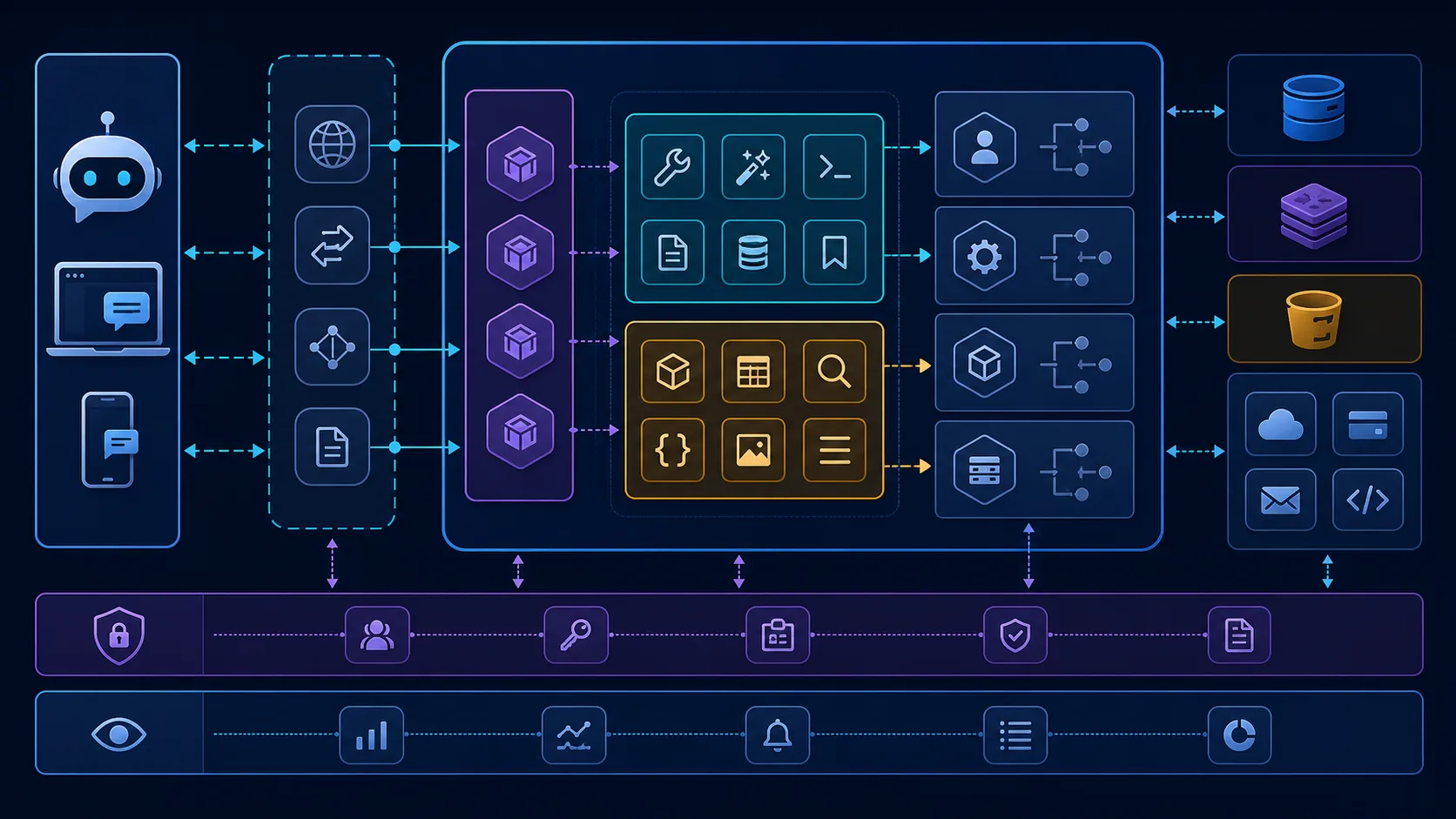
Organize the server around responsibilities instead of one large controller or one service that knows about every tool:
McpModule: protocol adapter, server lifecycle, tool and resource registration.TransportModule: connection, request parsing, protocol version handling, and response serialization.AuthModule: identity, issuer validation, scopes, tenant access, and session context.ToolModule: narrow tool definitions, schemas, policies, and handlers.DomainModule: business use cases and invariants independent of MCP.IntegrationModule: CRM, calendar, ticketing, billing, or internal API clients.JobsModule: queues and workers for slow or retryable work.ObservabilityModule: structured logs, metrics, traces, audit events, and alerts.
The protocol adapter should call a use case, not a database collection. This lets the same operation be reached from an HTTP API, a queue worker, an admin screen, or an MCP tool without duplicating business rules.
Start with tools that are small and explicit
A tool description is part of the safety boundary. A vague tool such as manage_customer_data makes it difficult for a client or reviewer to understand what can happen. Prefer narrow tools such as:
findCustomerByEmail;listOpenAppointments;createDraftFollowUp; orrequestRefundReview.
Separate reads from side effects. A read can often return immediately. A write should require stronger authorization, validate every field, record an audit event, and return an explicit result that the client can show to a person.
Do not expose an internal admin API by simply forwarding arbitrary paths or SQL-like filters. Each tool should map to a known application use case with a limited set of allowed parameters.
Validate inputs and outputs
TypeScript types help developers; runtime schemas protect the server. Validate tool input at the boundary with JSON Schema or the validation library used by your application. Reject unknown fields where possible, enforce length and range limits, normalize identifiers, and validate tenant ownership before calling an integration.
Validate outputs too. An external API may return missing or unexpected fields. A model should receive a stable result shape such as:
{
  "ok": true,
  "data": {
    "customerId": "cus_123",
    "status": "found"
  },
  "nextStep": "ask_for_confirmation"
}
For a failure, return a safe, structured explanation without secrets, stack traces, or data from another tenant. The client should be able to distinguish “not found,” “not authorized,” “temporarily unavailable,” and “human approval required.”
Authentication is not authorization
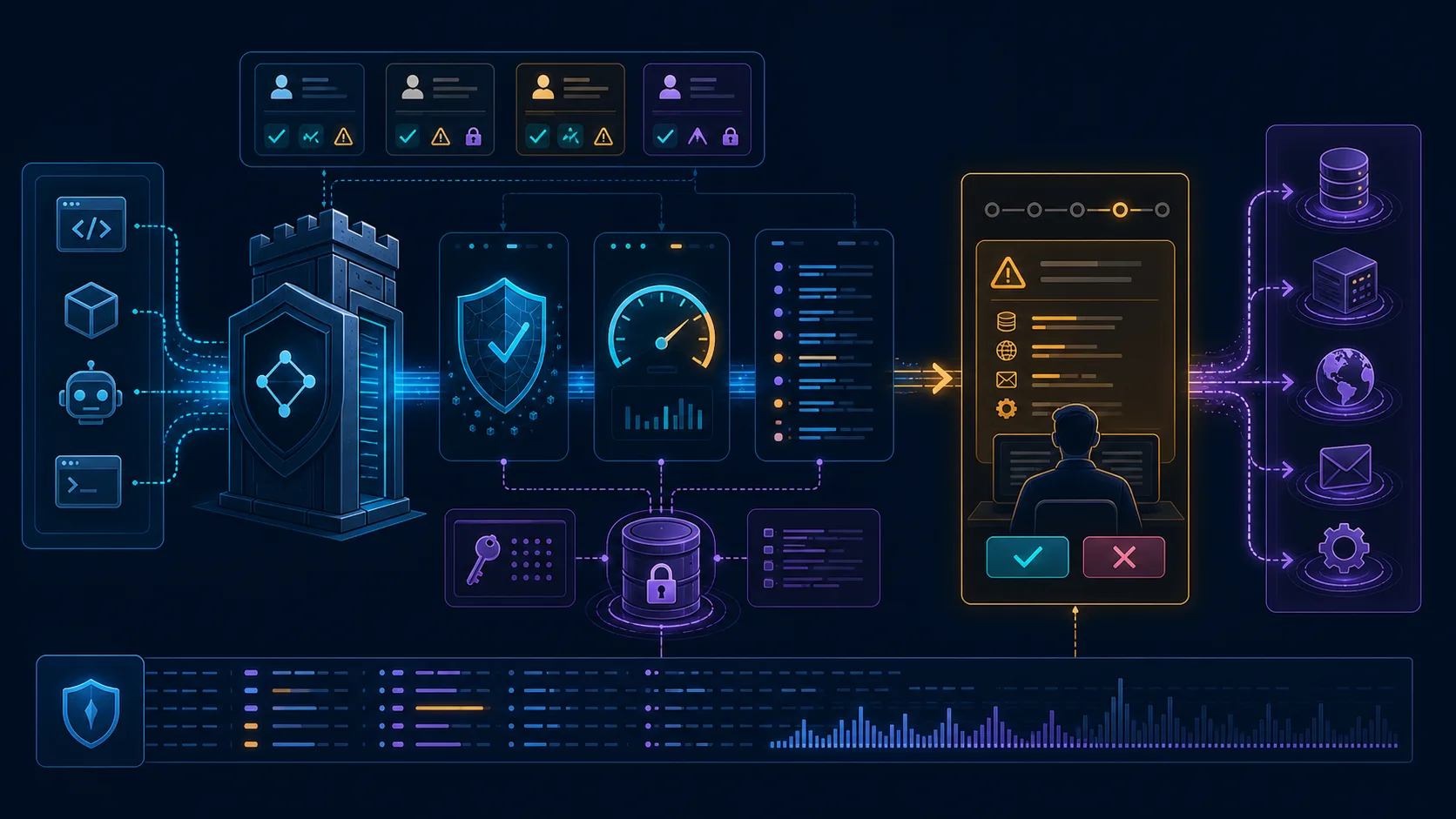
An authenticated MCP client is not automatically allowed to call every tool. Build authorization at the tool and resource level:
- identify the caller and tenant;
- validate the token issuer, audience, expiry, and required scopes;
- check the requested resource belongs to the tenant;
- apply role or policy checks before side effects;
- require step-up approval for high-impact actions; and
- record who requested the action and what policy decision was made.
The current MCP SDK migration notes call out authorization requirements such as issuer validation, credential isolation, and scope step-up as explicit concerns. Keep those decisions in an authorization service or guard so a new tool cannot accidentally skip them.
Keep slow work out of the request
An MCP request may call an integration that takes seconds or minutes. Do not hold a connection open for work that belongs in a durable job. Return an accepted state with a job identifier, process the work through a queue, and expose a safe way to check the result or receive an update.
Queues are also useful for retries, concurrency limits, provider rate limits, and human approval. The worker should be idempotent: if the same job is delivered twice, the side effect should not happen twice.
A useful job state model is:
requested → authorized → queued → running → waiting_for_approval → completed
with explicit failure paths such as retryable_failure, permanent_failure, and cancelled. Persist this state in a database or durable job store rather than in process memory.
The request lifecycle
For each request, make the path observable:
- Accept the connection and negotiate the supported protocol behavior.
- Authenticate the caller and create a request context.
- Resolve the tool or resource from an allowlisted registry.
- Validate input against the tool schema.
- Authorize the operation for the tenant and caller.
- Call a domain use case with a correlation ID.
- Queue slow or retryable work when necessary.
- Validate the result and redact sensitive fields.
- Emit an audit event and return a structured response.
- Record latency, provider errors, and the final business outcome.

This sequence makes debugging possible. When a user reports that an AI action “did not work,” you can answer whether the request was rejected, unauthorized, queued, retried, completed, or waiting for a person.
Rate limits and abuse controls
MCP servers can expose expensive operations and sensitive data. Apply limits at more than one level:
- connection or IP level for obvious abuse;
- identity and tenant level for fair use;
- tool level for expensive calls;
- concurrency level for providers with strict quotas; and
- payload level for large inputs or file operations.
Return a retryable response with a useful retry window when a limit is reached. Do not rely on the model client to self-limit. Add timeouts to every external call and make the timeout visible in metrics.
Observability should measure outcomes
Exception logs are not enough. Track:
- request count by tool, client, tenant, and outcome;
- authorization denials and validation failures;
- queue wait time and processing time;
- external provider latency and error rate;
- retries, duplicate attempts, and dead-letter jobs;
- human approvals and reversals; and
- sensitive-data access and high-impact side effects.
Use a correlation ID across the transport layer, NestJS request context, domain use case, provider client, worker, and audit record. Redact tokens, secrets, full transcripts, and personal data from normal logs.
Testing strategy
Test the MCP server at several levels:
- Schema tests: valid, missing, extra, oversized, and malformed inputs.
- Policy tests: each tool with allowed, denied, expired, and cross-tenant identities.
- Domain tests: business rules without a protocol or network dependency.
- Integration tests: provider timeouts, malformed responses, retries, and rate limits.
- Contract tests: tool names, descriptions, schemas, and result shapes.
- End-to-end tests: a client request through the transport boundary to a fake provider.
- Replay tests: the same event or job delivered multiple times.
Keep a small sanitized test set that represents normal use and adversarial use. Include prompt-injection-like text in tool arguments and verify that the application policy—not the model's wording—controls access.
Deployment checklist
Before exposing a production MCP server:
- use TLS and protect the transport endpoint;
- pin and review SDK and integration versions;
- validate issuer, audience, scopes, and tenant access;
- keep secrets in a managed secret store;
- restrict tools to the minimum required set;
- set timeouts, rate limits, and payload limits;
- back up durable state and test restoration;
- deploy workers separately when workloads require it;
- monitor health, queue depth, and provider dependencies;
- maintain an emergency tool-disable switch; and
- document a human fallback for every high-impact action.
Do not describe the server as production-ready because it can answer a demo prompt. Production readiness means a person can understand, authorize, observe, correct, and recover every meaningful action.
Common mistakes
Putting business rules in tool descriptions
Descriptions help a client choose a tool; they are not a security policy. Enforce rules in the backend.
Exposing one powerful “do anything” tool
Broad tools make authorization and auditing ambiguous. Split them into narrow operations with explicit side effects.
Trusting model-generated identifiers
Resolve the tenant, customer, and resource in application code. A model-provided identifier is input, not proof of ownership.
Retrying every failure
Retry only operations that are known to be safe or idempotent. A blind retry can send two messages, create two appointments, or charge twice.
Treating protocol support as a complete integration
The protocol solves interoperability. It does not solve your data model, permissions, observability, failure handling, or product decisions.
Frequently asked questions
Can I build an MCP server with NestJS?
Yes. Use NestJS for modules, dependency injection, guards, validation, domain services, queues, and observability, and use the MCP TypeScript SDK for the protocol adapter.
Should every tool call be synchronous?
No. Return quickly for small reads and use durable jobs for slow, retryable, or approval-based work. Make the job status and final result observable.
How do I secure an MCP server?
Authenticate clients, validate issuer and scopes, authorize each tool and resource, isolate tenant data, validate inputs and outputs, rate-limit expensive operations, protect secrets, and audit side effects.
Is MCP a replacement for REST APIs?
Usually not. REST or internal application APIs can remain the domain boundary. MCP is an adapter that makes selected capabilities discoverable and callable by compatible clients.
What should I build first?
Start with one read-only tool and one narrowly scoped action behind explicit approval. Add testing, logs, policy checks, and a failure path before adding more tools.
Build the boundary before the demo
An MCP server is valuable when it makes useful capabilities easier to access without making them less safe. Keep the protocol adapter thin, put business rules in tested use cases, and treat every tool as a permissioned integration. If you need an MCP server connected to an existing NestJS, Node.js, CRM, or internal API system, you can book a backend and AI integration consultation.