
How to Use AI for Studying: From Lecture Notes to Presentations and Exam Preparation
AI can write a beautiful answer in seconds. That does not mean you understand the answer. The best way to use AI as a student is to make it your explainer, research assistant, practice partner, and editor—not your replacement.
Think about a normal college week. You have a lecture PDF you barely understood, untidy notebook pages, a group presentation due on Friday, and an exam coming up. AI can help connect these pieces into one study workflow. The trick is knowing which tool to use, what to ask it, and what to check yourself.
This is a practical guide to doing exactly that, with prompts you can copy, tools worth trying, and a workflow that works whether you are preparing for a semester exam, making slides, or learning a new technical subject.
Start with the rule that changes everything
Use AI to help you learn the material, not to avoid learning it.If a tool creates your entire assignment and you submit it without understanding it, you have gained a document—not a skill. A better process is to ask it to explain the material, reveal gaps, challenge your reasoning, and help you turn your own work into something clearer.
Here is the learning loop I recommend:
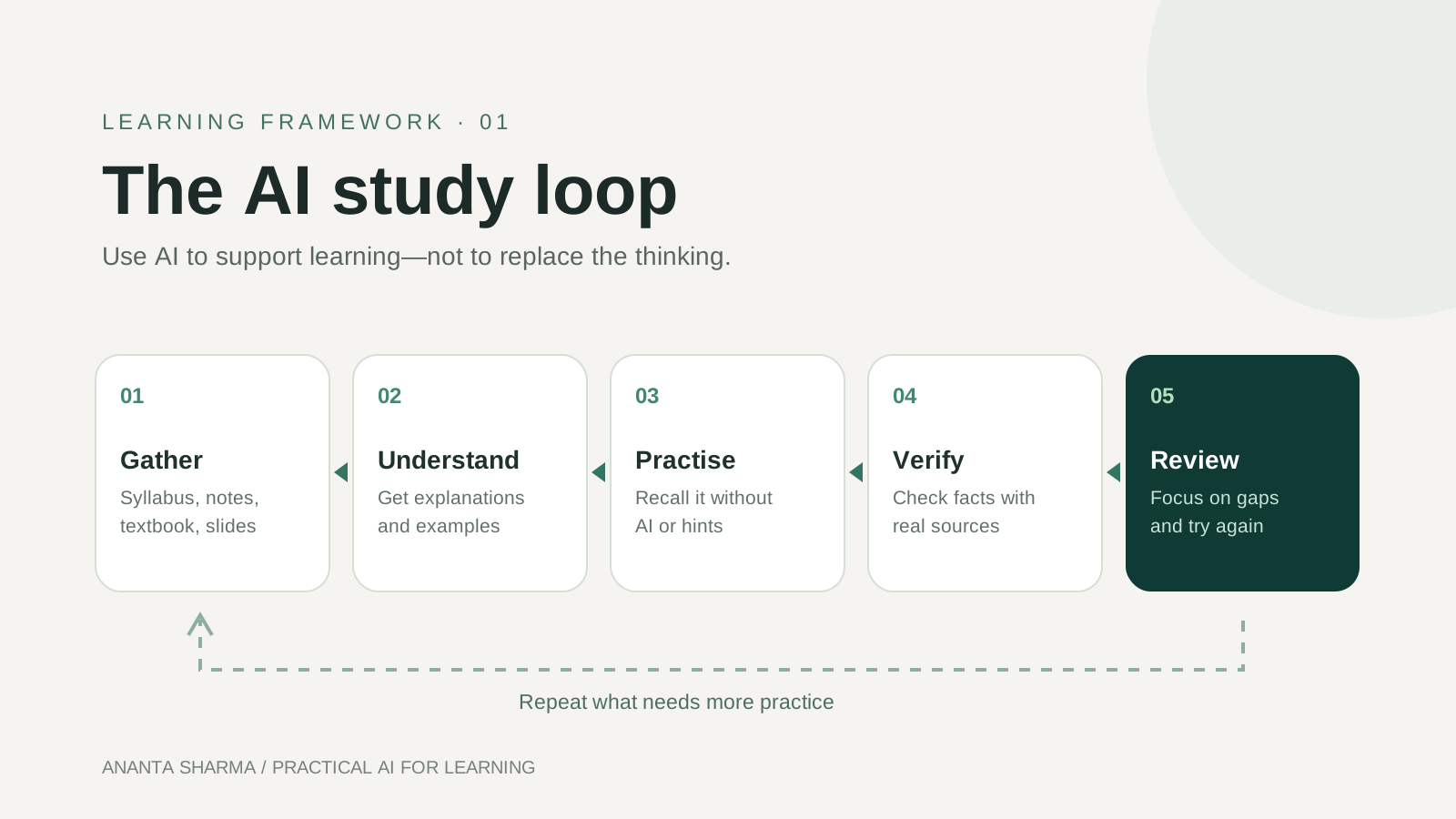
You can reuse this loop for almost every subject. For example, study a networking chapter, explain TCP versus UDP in your own words, answer three questions without looking at notes, and then check the weak parts against the textbook.
1. Turn PDFs, textbook chapters, and handwritten notes into a usable study guide
Students often spend more time organizing material than learning it. Start with your syllabus, teacher's slides, textbook pages, and your own notes. Upload or paste the relevant parts into a tool that supports your file format.
Try NotebookLM (also presented by Google as Gemini Notebook) when you want answers grounded in uploaded sources. It can help summarize source material, generate study guides, quizzes, flashcards, and other review formats. Follow its citations back to the original document. Try ChatGPT Study Mode when you want explanations, guided questions, and feedback rather than only a finished answer. Prompt to copy:I am a college student studying [subject]. Use only the uploaded notes and syllabus for factual claims. Organize this unit into key concepts, definitions, examples, formulas, and likely misunderstandings. Give page or slide references where available. Mark anything missing from the sources as "not covered" instead of guessing. End with five questions I should be able to answer without notes.
If you photograph handwritten notes, make sure the writing is clear. Ask the model to transcribe a sample first; handwritten symbols, formulas, and diagrams are especially easy to misread. Keep the original files beside the summary.
Do not stop at a summary. Close it, then write the topic in your own words. If you cannot explain it, request a simpler analogy or a worked example.2. Make presentations that tell a story, not just fill slides
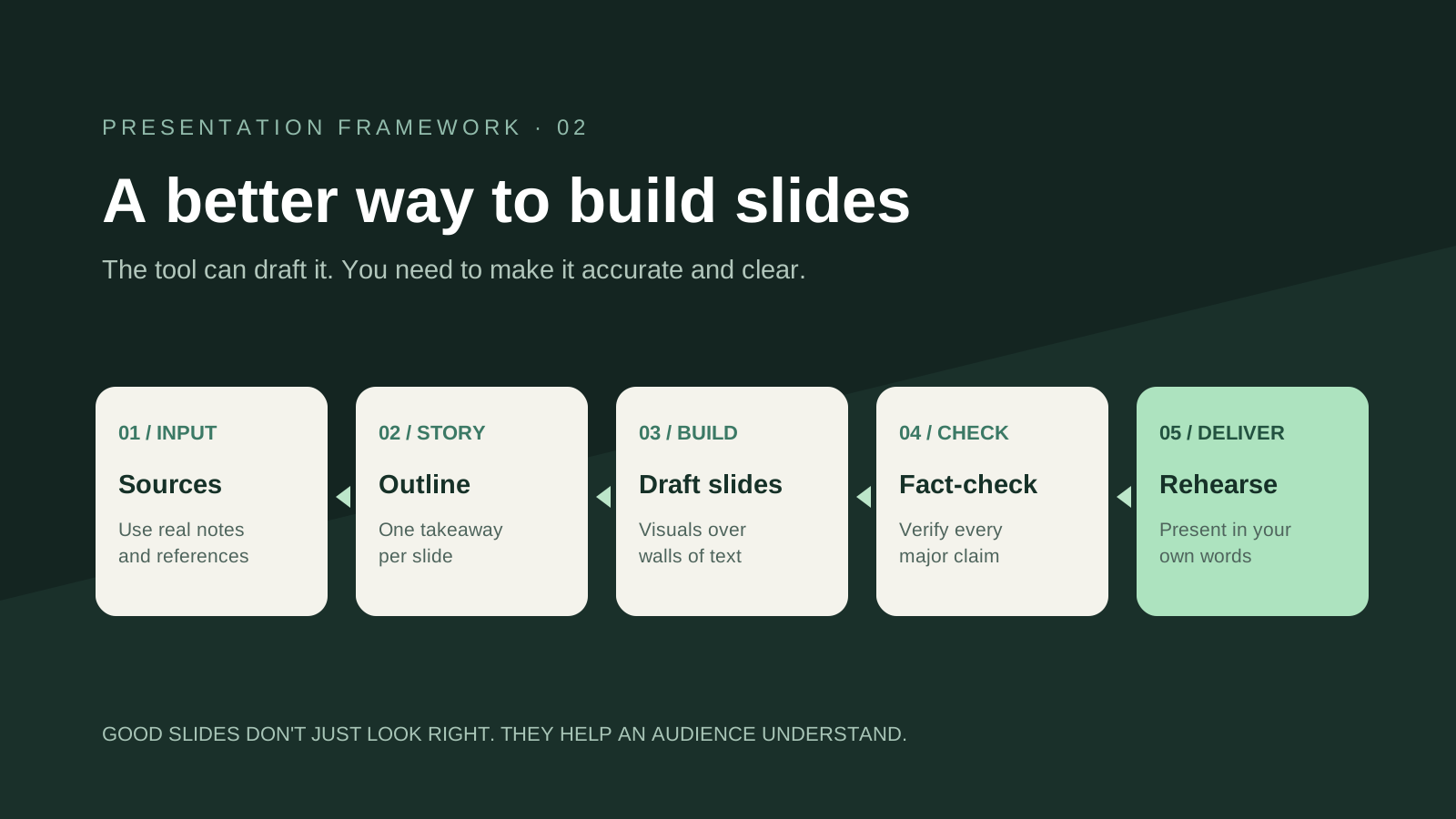
A presentation should guide an audience through an idea. It should not be a wall of AI-generated text.
Start with three inputs: who the audience is, the single takeaway, and the evidence you have. Ask AI for a slide outline first; review the order before making slides. Tools such as Google Slides with Gemini can help generate or edit presentations for eligible accounts. You can also use AI for outlines and write the slides yourself in PowerPoint, Google Slides, or Canva.
 Prompt to copy:
I need a seven-slide presentation on [topic] for [class/audience], lasting [number] minutes. My source material is below. First propose a story with a clear introduction, three main points, one example, a conclusion, and references. For each slide provide: a short headline, at most three concise bullets, one suggested visual, speaker notes, and the source for factual claims. Do not invent statistics or citations. Ask me to approve the outline before drafting slides.
A reliable seven-slide structure is: title and question; why it matters; core concept; how it works; a practical example; limitations or trade-offs; conclusion and references. Adjust that structure to the subject rather than following it blindly.
Before presenting: verify every claim, replace generic visuals with relevant charts or screenshots, read through your notes aloud, and rehearse without reading each slide word for word. You—not the tool—must be able to answer questions afterward.3. Ask AI to teach you one concept at a time
For difficult material, a patient tutor is more useful than a giant answer. Ask for one explanation, one example, and one question before moving forward. If you are learning programming, mathematics, accounting, or science, ask the model to explain the reasoning and let you attempt each step.
Prompt to copy:Act as a tutor, not an answer generator. I am struggling with [concept]. Ask what I understand first. Explain one part in simple English with a concrete example. Then give me a similar question to solve alone. Wait for my attempt before correcting me. If I am wrong, give a hint before revealing the solution.
For multilingual study, try: "Explain this in simple English, then clarify difficult terms in Nepali, but keep the technical vocabulary in English." This can make the topic easier to approach while preserving the terms you need for exams.
4. Prepare for exams with flashcards, mock papers, and viva practice
AI is useful for active recall: forcing yourself to retrieve information instead of rereading the same page. Give it the syllabus, unit names, exam format, and your actual notes, then ask it to produce questions at different difficulty levels.
Try these study sessions:
- Flashcards: create one clear question per card, with a short answer and a source reference.
- Five-mark and ten-mark practice: write an outline first; have AI check for missing points and weak explanations.
- Multiple-choice practice: ask for plausible distractors and an explanation of why the wrong options are wrong.
- Viva simulation: answer one oral question at a time; ask for follow-ups based on your response.
- Past-paper analysis: group previous questions by syllabus topic without claiming you can predict the exact exam.
I have an exam in [subject]. Based only on the attached syllabus and notes, quiz me with ten questions: four easy, four medium, and two difficult. Ask one at a time. Wait for my answer, grade it using a clear rubric, explain what I missed, and keep a list of weak topics. At the end, create a 30-minute revision plan for those topics.
For calculations and code, solve the final problem yourself. Compare your steps against a textbook, official solution, calculator, compiler, or teacher's method when appropriate.
5. Research assignments without inventing sources
AI can help narrow a research question, suggest search terms, compare arguments, outline an essay, and identify what evidence is missing. But it can also confidently produce a fake author, publication, DOI, or quotation.
Use this workflow: choose a question, search your library or credible scholarly sources, read the material, take source-linked notes, draft your argument, and use AI to challenge it. Ask it to separate source-supported facts from suggestions. Open and verify every citation before you include it.
Prompt to copy:I am researching [question]. Help me break it into three smaller research questions. Suggest search keywords and types of reliable sources I should consult. Do not fabricate references. Once I provide actual papers or articles, make an evidence table with claim, source title, page/section, limitations, and points that need verification.
For essays, you can also ask: "Here is my draft and marking rubric. Identify unclear reasoning and unsupported claims, but do not rewrite the essay in a voice that is not mine."
6. Turn recorded lectures and class discussions into revision material
If your lecturer and institution allow recording, a transcript can be a powerful study asset. Use an approved transcription tool, correct technical terms and names, and ask AI to produce a concise recap, key terms, and questions you still need to ask in class. Never assume an automatic transcript is perfectly accurate.
A helpful prompt is: "Separate what the lecturer explicitly said, what the class discussed, and what you infer. Include timestamps if available. List unclear points for me to verify."
Audio summaries can also help with review during commutes or breaks. NotebookLM offers audio-style overviews based on uploaded sources, but listen critically rather than using them as your sole reference.
7. Build a realistic revision plan instead of a beautiful but impossible timetable
A timetable is only useful if you can follow it. Give AI your exam date, available hours, subject difficulty, and weak areas, then ask it to prioritize topics and schedule recall practice.
Prompt to copy:My exam is on [date]. I have [hours] per day and these [topics]. Rank them by importance and my confidence level. Create a realistic seven-day plan that includes learning, question practice, short breaks, and spaced review. Do not schedule every minute. Give me a minimum plan for busy days.
Review the plan daily. If you miss a session, adjust the next day instead of trying to make up an unrealistic number of hours.
8. Use AI to improve your writing, not erase your voice
For reports, lab explanations, emails to lecturers, or project documentation, AI can make your writing clearer and more structured. Start with your own ideas and evidence. Ask for feedback on logic, grammar, transitions, or whether your explanation answers the question.
Keep the distinction clear: editing your work is different from passing generated work off as your own. Follow your institution's rules on AI use and disclosure. If a task explicitly prohibits AI assistance, respect that boundary.
Which AI tool should you use for which study task?
| Your task | Useful starting point | What you still need to do |
|---|---|---|
| Understand a confusing topic | ChatGPT Study Mode | Explain it back without looking |
| Summarize multiple PDFs or lecture files | NotebookLM / Gemini Notebook | Check the cited pages and missing context |
| Create flashcards and quizzes | NotebookLM or a chat assistant | Answer without seeing the solution |
| Draft a slide structure | Chat assistant; Gemini in Google Slides if available | Edit visuals, verify facts, rehearse |
| Improve an essay outline | Chat assistant | Read sources and write the argument yourself |
| Revise from a recorded lecture | Approved transcript tool and NotebookLM | Check transcript errors and recording consent |
| Prepare for viva | ChatGPT Study Mode | Respond aloud in your own words |
| Verify math, statistics, or programming | Textbook, calculator, code runner, official docs | Check inputs and reasoning independently |
Features, supported files, pricing, and account eligibility change. Check the product's current documentation before planning a workflow around a specific feature.
A personal note about using AI responsibly

As someone who works with software and AI, I think the most useful question is not "Can AI do this assignment?" It is "Can this tool help me understand the topic well enough to do it myself?"
A strong AI-assisted study session ends with something you produced or proved: an explanation in your own words, a slide you can confidently present, a problem solved unaided, or a better question to ask your teacher. That is the difference between using a shortcut and building a skill.
The checklist I use to judge any AI-generated study material
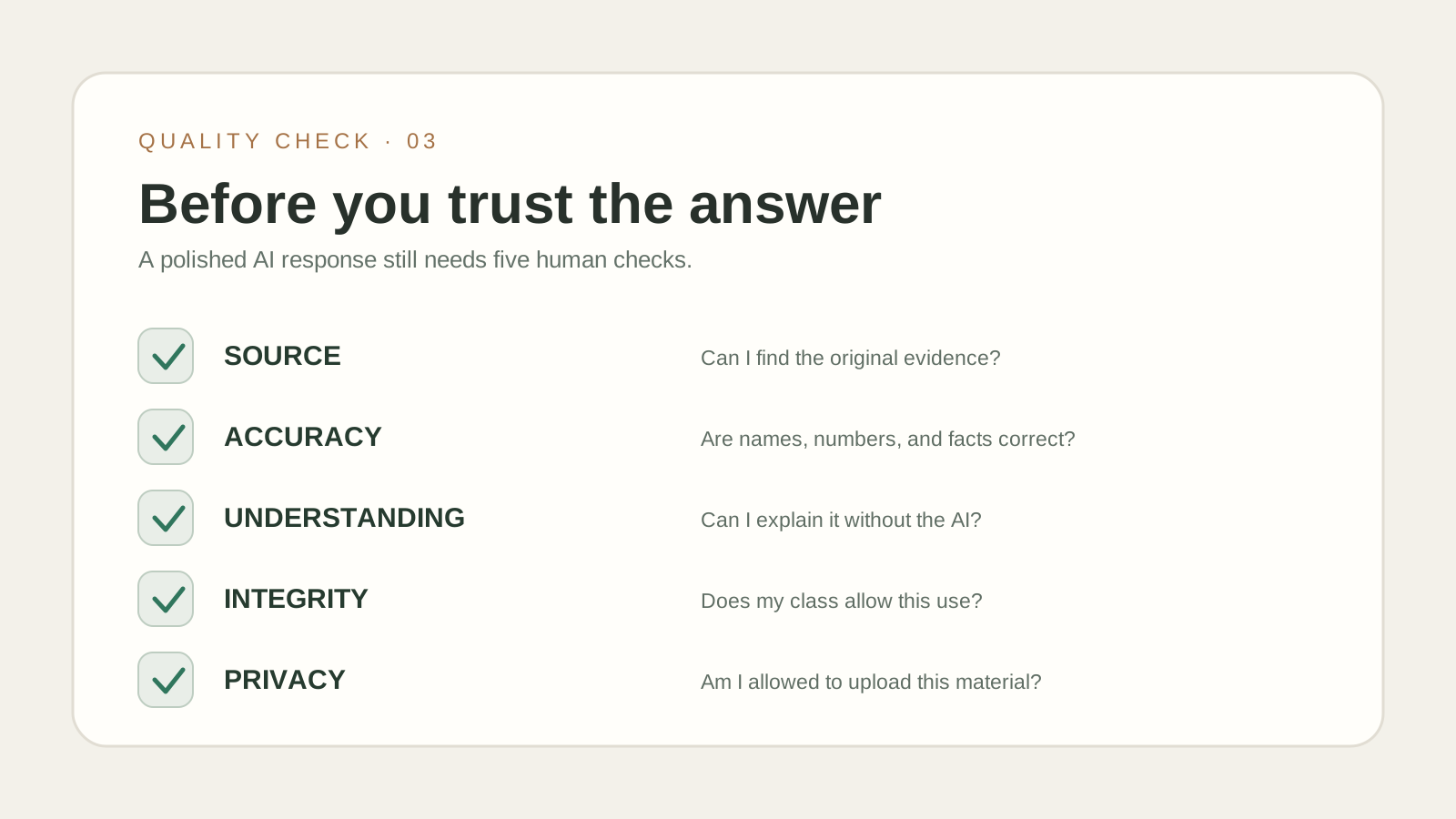
Before trusting a summary, presentation, research note, or answer, ask:
- Source: Which document or reliable publication supports this claim?
- Accuracy: Are the definitions, numbers, formulas, and citations correct?
- Understanding: Could I explain this without opening the AI tool?
- Academic integrity: Does my class permit this kind of assistance, and should I disclose it?
- Privacy: Am I uploading personal, confidential, unpublished, or copyrighted material without permission?
These checks matter most when the answer looks polished. Confident wording is not evidence.
A 45-minute AI study session you can try today
- 0–5 minutes: choose one small topic and gather the relevant trusted notes.
- 5–15 minutes: ask AI to explain it with an example; verify confusing claims against the source.
- 15–25 minutes: close the explanation and write your own version on paper.
- 25–35 minutes: take a five-question quiz with no hints.
- 35–45 minutes: review wrong answers, update two or three flashcards, and schedule a short revisit.
The goal is not to use every tool in one session. It is to spend more time thinking and practising and less time staring at a blank page.
Frequently asked questions
Is it okay to use ChatGPT for studying?
Usually, using AI to explain concepts, practise questions, or organize permitted study material can be helpful. For graded assignments, exams, and submitted work, follow your teacher's or institution's specific AI-use policy.
Can NotebookLM make summaries and study materials from my notes?
Yes. NotebookLM can work with supported uploaded sources and offers source-grounded summaries and study aids such as quizzes, flashcards, and audio overviews. Always confirm important details against the source material.
Can AI make a complete PowerPoint presentation?
Some tools can generate presentation drafts or editable slides, depending on the product and account. Treat these as a first draft: fact-check claims, fix the narrative, simplify crowded slides, and rehearse the talk yourself.
What is the biggest mistake students make with AI?
Accepting a fluent answer without verifying it or practising the underlying skill. An accurate-looking summary is not proof that you have learned the topic.
Final thought
AI is most valuable when it helps you move from "I don't understand this" to "I can explain, apply, and defend this idea myself." Use it to organize, explain, question, and review. Keep the evidence, reasoning, and responsibility with you.